Subflag Rails
Feature flags that return strings, numbers, JSON — not just booleans.
limit = subflag_value(:upload_limit_mb, default: 10)
tier_config = subflag_value(:pricing_tiers, default: { basic: 5, pro: 50 })
welcome = subflag_value(:welcome_message, default: "Hello")
Target different values to different users:
# config/initializers/subflag.rb
Subflag::Rails.configure do |config|
  config.backend = :active_record

  config.user_context do |user|
    { targeting_key: user.id.to_s, plan: user.plan, email: user.email }
  end
end
# Premium users get 100, free users get 10
subflag_value(:max_projects, default: 10)
Self-hosted or cloud. Same API.
Quick Start
gem "subflag-rails"
rails generate subflag:install --backend=active_record
rails db:migrate
# config/routes.rb
mount Subflag::Rails::Engine => "/subflag"
No external dependencies. Admin UI included.
Backends
Choose where your flags live:
| Backend | Use Case | Flags Stored In |
|---|---|---|
:active_record |
Self-hosted, no external dependencies, built-in admin UI | Your database |
:subflag |
Dashboard, environments, percentage rollouts | Subflag Cloud |
:memory |
Testing and development | In-memory hash |
Subflag Cloud
Dashboard, environments, percentage rollouts, and user targeting.
gem "subflag-rails"
gem "subflag-openfeature-provider", ">= 0.3.2"
rails generate subflag:install
Add your API key to Rails credentials:
rails credentials:edit
subflag:
  api_key: sdk-production-your-key-here
Or set the SUBFLAG_API_KEY environment variable.
Memory (Testing)
In-memory flags for tests and local development.
rails generate subflag:install --backend=memory
Set flags programmatically:
Subflag::Rails.provider.set(:new_checkout, true)
Subflag::Rails.provider.set(:max_projects, 100)
Usage
Controllers & Views
Helpers are automatically available and scoped to current_user:
# Controller
class ProjectsController < ApplicationController
  def index
    if subflag_enabled?(:new_dashboard)
      # show new dashboard
    end

    @max_projects = subflag_value(:max_projects, default: 3)
  end
end
<!-- View -->
<% if subflag_enabled?(:new_checkout) %>
  <%= render "new_checkout" %>
<% end %>

<h1><%= subflag_value(:headline, default: "Welcome") %></h1>

<p>You can create <%= subflag_value(:max_projects, default: 3) %> projects</p>
Flag Accessor DSL
For multiple flag checks, use the flag accessor:
flags = subflag_for # auto-scoped to current_user
if flags.beta_feature?
headline = flags.(default: "Hello!")
max = flags.max_projects(default: 3)
end
Or use Subflag.flags directly:
# With user context
flags = Subflag.flags(user: current_user)
flags.new_checkout?              # => true/false
flags.max_projects(default: 3)   # => 100

# Bracket access for exact flag names
flags["my-exact-flag", default: "value"]

# Full evaluation details
result = flags.evaluate(:max_projects, default: 3)
result.value    # => 100
result.variant  # => "premium"
result.reason   # => :targeting_match
Flag Types
The default value determines the expected type:
# Boolean (? suffix, default optional)
subflag_enabled?(:new_checkout)           # default: false
subflag_enabled?(:new_checkout, default: true)

# String
subflag_value(:headline, default: "Welcome")

# Integer
subflag_value(:max_projects, default: 3)

# Float
subflag_value(:tax_rate, default: 0.08)

# Hash/Object
subflag_value(:feature_limits, default: { max_items: 10 })
User Targeting
Configure how to extract context from user objects:
# config/initializers/subflag.rb
Subflag::Rails.configure do |config|
  config.user_context do |user|
    {
      targeting_key: user.id.to_s,
      email: user.email,
      plan: user.subscription&.plan_name || "free",
      admin: user.admin?
    }
  end
end
Now flags can return different values based on user attributes:
# In Subflag dashboard: max-projects returns 3 for "free", 100 for "premium"
subflag_value(:max_projects, default: 3)  # => 3 or 100 based on user's plan
Override User Context
# No user context
subflag_enabled?(:public_feature, user: nil)

# Different user
subflag_value(:max_projects, user: admin_user, default: 3)
Flag Naming
Flag names use lowercase letters, numbers, and dashes:
- Valid:
new-checkout,max-api-requests,feature1 - Invalid:
new_checkout,NewCheckout,my flag
In Ruby, use underscores — they're automatically converted to dashes:
subflag_enabled?(:new_checkout) # looks up "new-checkout"
Request Caching
Enable per-request caching to avoid multiple API calls for the same flag:
# config/application.rb
config.middleware.use Subflag::Rails::RequestCache::Middleware
Now multiple checks for the same flag in one request hit the API only once:
# Without caching: 3 API calls
# With caching: 1 API call (cached for subsequent checks)
subflag_enabled?(:new_checkout)  # API call
subflag_enabled?(:new_checkout)  # Cache hit
subflag_enabled?(:new_checkout)  # Cache hit
Cross-Request Caching
By default, prefetched flags are only cached for the current request. To cache across multiple requests using Rails.cache, set a TTL:
# config/initializers/subflag.rb
Subflag::Rails.configure do |config|
  config.api_key = Rails.application.credentials.subflag_api_key
  config.cache_ttl = 30.seconds  # Cache flags in Rails.cache for 30 seconds
end
With cache_ttl set:
- First request fetches from API and stores in
Rails.cache - Subsequent requests (within TTL) read from
Rails.cache— no API call - After TTL expires, next request fetches fresh data
This significantly reduces API load for high-traffic applications. Choose a TTL that balances freshness with performance — 30 seconds is a good starting point.
Bulk Flag Evaluation (Prefetch)
For optimal performance, prefetch all flags for a user in a single API call. This is especially useful when your page checks multiple flags:
# config/application.rb (required)
config.middleware.use Subflag::Rails::RequestCache::Middleware
class ApplicationController < ActionController::Base
  before_action :prefetch_feature_flags

  private

  def prefetch_feature_flags
    subflag_prefetch  # Fetches all flags for current_user in one API call
  end
end
Now all subsequent flag lookups use the cache — no additional API calls:
# In your controller/view - all lookups are instant (cache hits)
subflag_enabled?(:new_checkout)           # Cache hit
subflag_value(:max_projects, default: 3)  # Cache hit
subflag_value(:headline, default: "Hi")   # Cache hit
How It Works
- Single API call:
subflag_prefetchcalls/sdk/evaluate-allto fetch all flags - Per-request cache: Results are stored in
RequestCachefor the duration of the request - Zero-latency lookups: Subsequent
subflag_enabled?andsubflag_valuecalls read from cache
Prefetch Without current_user
# No user context
subflag_prefetch(nil)

# With specific user
subflag_prefetch(admin_user)

# With additional context
subflag_prefetch(current_user, context: { device: "mobile" })
Direct API
You can also use the module method directly:
Subflag.prefetch_flags(user: current_user)
# or
Subflag::Rails.prefetch_flags(user: current_user)
Configuration
Subflag::Rails.configure do |config|
  # Backend: :subflag (cloud), :active_record (self-hosted), :memory (testing)
  config.backend = :subflag

  # API key - required for :subflag backend
  config.api_key = "sdk-production-..."

  # API URL (default: https://api.subflag.com)
  config.api_url = "https://api.subflag.com"

  # Cross-request caching via Rails.cache (optional, :subflag backend only)
  # When set, prefetched flags are cached for this duration
  config.cache_ttl = 30.seconds

  # Logging
  config.logging_enabled = Rails.env.development?
  config.log_level = :debug  # :debug, :info, :warn

  # User context - works with all backends
  config.user_context do |user|
    { targeting_key: user.id.to_s, plan: user.plan }
  end
end
ActiveRecord Flag Model
Note: This section only applies when using
backend: :active_record. For Subflag Cloud, manage flags in the dashboard.
Flags are stored in the subflag_flags table:
| Column | Type | Description |
|---|---|---|
key |
string | Flag name (lowercase, dashes, e.g., new-checkout) |
value |
text | Default value (what everyone gets) |
value_type |
string | Type: boolean, string, integer, float, object |
enabled |
boolean | Whether the flag is active (default: true) |
description |
text | Optional description |
targeting_rules |
json | Optional rules for showing different values to different users |
# Create flags
Subflag::Rails::Flag.create!(key: "max-projects", value: "100", value_type: "integer")

# Query flags
Subflag::Rails::Flag.enabled.find_each { |f| puts "#{f.key}: #{f.typed_value}" }

# Disable a flag
Subflag::Rails::Flag.find_by(key: "new-checkout")&.update!(enabled: false)
Targeting Rules (ActiveRecord)
Show different flag values to different users based on their attributes. Perfect for internal testing before wider rollout.
Tip: Use the Admin UI to manage targeting rules visually instead of editing JSON.
First, configure user context:
# config/initializers/subflag.rb
Subflag::Rails.configure do |config|
  config.backend = :active_record

  config.user_context do |user|
    {
      targeting_key: user.id.to_s,
      email: user.email,
      role: user.role,           # e.g., "admin", "developer", "qa"
      plan: user.plan            # e.g., "free", "pro", "enterprise"
    }
  end
end
Create flags with targeting rules:
# Internal team sees new feature, everyone else sees old
Subflag::Rails::Flag.create!(
  key: "new-dashboard",
  value: "false",                    # Default: everyone gets false
  value_type: "boolean",
  targeting_rules: [
    {
      "value" => "true",             # Internal team gets true
      "conditions" => {
        "type" => "OR",
        "conditions" => [
          { "attribute" => "email", "operator" => "ENDS_WITH", "value" => "@yourcompany.com" },
          { "attribute" => "role", "operator" => "IN", "value" => ["admin", "developer", "qa"] }
        ]
      }
    }
  ]
)
Progressive rollout with multiple rules (first match wins):
Subflag::Rails::Flag.create!(
  key: "max-projects",
  value: "5",                        # Default: everyone gets 5
  value_type: "integer",
  targeting_rules: [
    { "value" => "1000", "conditions" => { "type" => "AND", "conditions" => [{ "attribute" => "role", "operator" => "EQUALS", "value" => "admin" }] } },
    { "value" => "100", "conditions" => { "type" => "AND", "conditions" => [{ "attribute" => "email", "operator" => "ENDS_WITH", "value" => "@yourcompany.com" }] } },
    { "value" => "25", "conditions" => { "type" => "AND", "conditions" => [{ "attribute" => "plan", "operator" => "EQUALS", "value" => "pro" }] } }
  ]
)
Supported operators:
| Operator | Example | Description |
|---|---|---|
EQUALS |
{ "attribute" => "role", "operator" => "EQUALS", "value" => "admin" } |
Exact match |
NOT_EQUALS |
{ "attribute" => "env", "operator" => "NOT_EQUALS", "value" => "prod" } |
Not equal |
IN |
{ "attribute" => "role", "operator" => "IN", "value" => ["admin", "qa"] } |
Value in list |
NOT_IN |
{ "attribute" => "country", "operator" => "NOT_IN", "value" => ["RU", "CN"] } |
Value not in list |
CONTAINS |
{ "attribute" => "email", "operator" => "CONTAINS", "value" => "test" } |
String contains |
NOT_CONTAINS |
{ "attribute" => "email", "operator" => "NOT_CONTAINS", "value" => "spam" } |
String doesn't contain |
STARTS_WITH |
{ "attribute" => "user_id", "operator" => "STARTS_WITH", "value" => "test-" } |
String prefix |
ENDS_WITH |
{ "attribute" => "email", "operator" => "ENDS_WITH", "value" => "@company.com" } |
String suffix |
GREATER_THAN |
{ "attribute" => "age", "operator" => "GREATER_THAN", "value" => 18 } |
Numeric greater than |
LESS_THAN |
{ "attribute" => "items", "operator" => "LESS_THAN", "value" => 100 } |
Numeric less than |
GREATER_THAN_OR_EQUAL |
{ "attribute" => "score", "operator" => "GREATER_THAN_OR_EQUAL", "value" => 80 } |
Numeric greater or equal |
LESS_THAN_OR_EQUAL |
{ "attribute" => "score", "operator" => "LESS_THAN_OR_EQUAL", "value" => 50 } |
Numeric less or equal |
MATCHES |
{ "attribute" => "email", "operator" => "MATCHES", "value" => ".*@company\\.com$" } |
Regex match |
Combining conditions:
# OR: any condition matches
{
  "type" => "OR",
  "conditions" => [
    { "attribute" => "email", "operator" => "ENDS_WITH", "value" => "@company.com" },
    { "attribute" => "role", "operator" => "EQUALS", "value" => "admin" }
  ]
}

# AND: all conditions must match
{
  "type" => "AND",
  "conditions" => [
    { "attribute" => "plan", "operator" => "EQUALS", "value" => "enterprise" },
    { "attribute" => "country", "operator" => "IN", "value" => ["US", "CA"] }
  ]
}
Percentage rollouts:
Gradually roll out features to a percentage of users using the Admin UI:
- Create or edit a flag at
/subflag - Add a targeting rule with a percentage (0-100)
- Optionally combine with conditions (e.g., "50% of pro users")
Assignment is deterministic — the same user always gets the same result for the same flag.
Note: Percentage rollouts require
targeting_keyin your user context (typically the user ID).
How evaluation works:
- Flag disabled? → return code default
- For each rule (in order): if context matches → return rule's value
- No rules matched? → return flag's default
value
This lets you progressively widen access by adding rules, without changing existing ones.
Admin UI (ActiveRecord)
Mount the admin UI to manage flags and targeting rules visually:
# config/routes.rb
Rails.application.routes.draw do
  mount Subflag::Rails::Engine => "/subflag"
  # ... your other routes
end
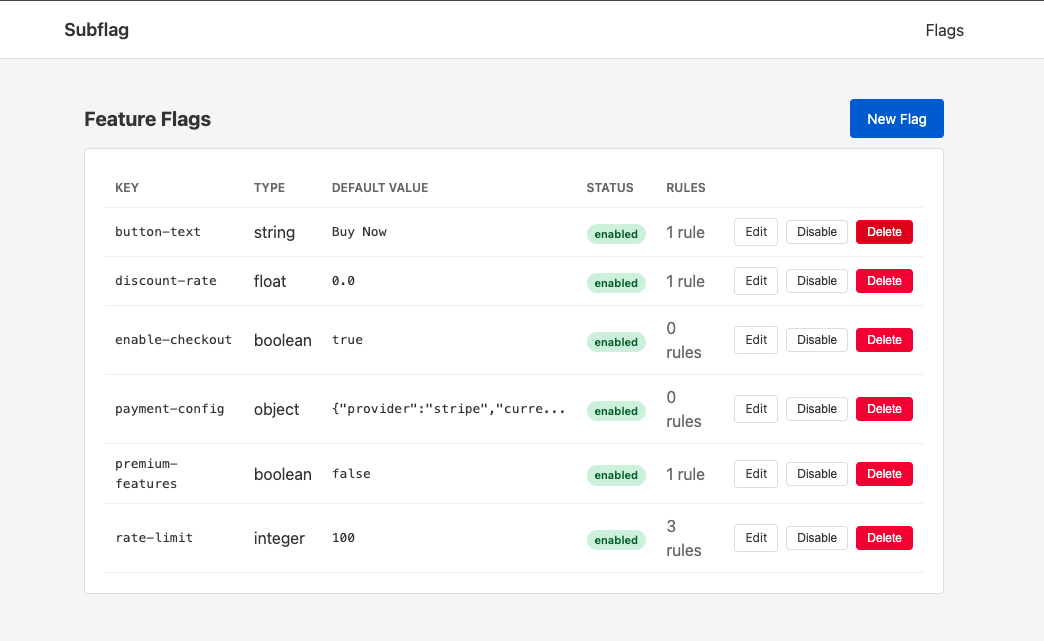
The admin UI provides:
- List, create, edit, and delete flags
- Toggle flags enabled/disabled
- Visual targeting rule builder (no JSON editing)
- Test rules against sample contexts
Secure the admin UI:
# config/initializers/subflag.rb
Subflag::Rails.configure do |config|
  config.backend = :active_record

  # Require authentication for admin UI
  config.admin_auth do
    redirect_to main_app.root_path unless current_user&.admin?
  end
end
Visit /subflag in your browser to access the admin UI.
Testing
Stub flags in your tests:
# spec/rails_helper.rb (RSpec)
require "subflag/rails/test_helpers"
RSpec.configure do |config|
  config.include Subflag::Rails::TestHelpers
end

# test/test_helper.rb (Minitest)
require "subflag/rails/test_helpers"
class ActiveSupport::TestCase
  include Subflag::Rails::TestHelpers
end
# In your specs/tests
it "shows new checkout when enabled" do
  stub_subflag(:new_checkout, true)
  stub_subflag(:max_projects, 100)

  visit checkout_path
  expect(page).to have_content("New Checkout")
end

# Stub multiple at once
stub_subflags(
  new_checkout: true,
  max_projects: 100,
  headline: "Welcome!"
)
Documentation
License
MIT