Spree Avalara AvaTax official extension

The new officially supported Avalara AvaTax extension for Spree Commerce using Avalara REST API v2.
- Introduction
- Maintenance & support
- Features
- Installation
- Setup
- Migrating from spree_avatax_certified
- Testing
- Contributing
- About Spark Solutions
Introduction

 Avalara AvaTax is a cloud-based solution automating transaction tax calculations and the tax filing process. Avalara provides real-time tax calculation using tax content from more than 12,000 US taxing jurisdictions and over 200 countries, ensuring your transaction tax is calculated based on the most current tax rules.
The new officially certified Spree AvaTax extension helps Spree users and developers to switch from the old Avalara REST API V1 to the latest Avalara REST API v2. In the words of Avalara developers "the benefits are huge" as the new API V2 offers improved AvaTax performance, reliability and a wide range of new functionality.
And since AvaTax delivers sales and use tax calculations at the time of checkout or billing — in real time — the business benefits from implementing the new Spree AvaTax V2 extension are significant, potentially improving conversion rates and sales results.
Maintenance & support
The new extension comes with technical support from both Spree Commerce core team and Avalara and will be maintained to keep up with the innovations introduced by Avalara in the future. The old extension will no longer be maintained or supported.
For more information, support and guidance on how to implement Spree AvaTax V2 extension feel free to:
- reach out through the Spree contact form
- join the Spree slack channel #spree-avatax at slack.spreecommerce.org
Features
- Tax calculation (additional/included tax), US state tax, Canadian HST, VAT supported
- Address validation for US & Canada
- Commiting complete orders
- Cancelling (voiding) orders
- Refunding orders
- GetByCodeService for getting SalesInvoice for order from Avatax
- GetTaxService for getting totalTaxCalculated for order from Avatax
- AvataxLog for logging API calls
- Caching responses for improved performance
- Multiple company (store) support
Installation
Add this extension to your
Gemfilewith this line:gem 'spree_avatax_official'Install the gem using Bundler:
bundle install
- Run the install generator
bundle exec rails g spree_avatax_official:install
- Restart your server
If your server was running, restart it so that it can find the assets properly.
Setup
In order to configure tax calculation you need to:
- Connect Spree to AvaTax
- Configure Spree Stock Location
- Configure AvaTax settings
- Assign an AvaTax System Tax Code to a Tax Category
Connect Spree to AvaTax
In order to use spree_avatax_official extension, you need to configure your
Avatax credentials. To do so, open spree admin panel and go to Configurations
and then Avatax Settings.

Company code, account number and license key can be configured in the Avatax Credentials section of the form.
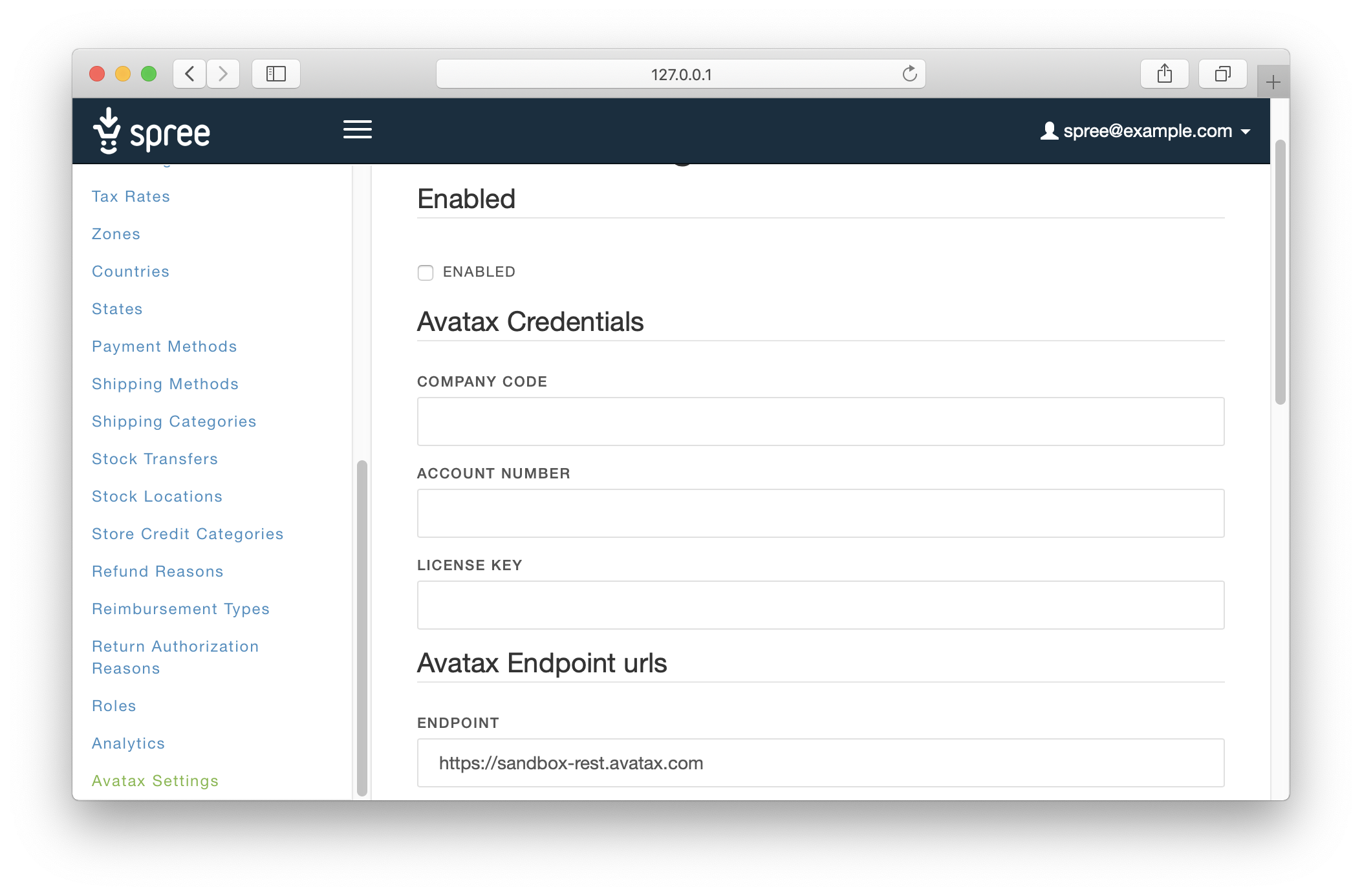
- Account Number: Provided during your AvaTax account activation process.
- License Key: Provided during your AvaTax account activation process.
- Company Code: Company profile identifier in the AvaTax Admin Console.
Service URL is an URL to connect to the Development or Production AvaTax services. It can be configured in the Avatax Endpoint urls section below.

You can test settings you provided using the Ping Avatax button under the form

Configure Spree Stock Locations
In order for extension to be able to calculate the taxes, you need to set your stock locations addresses properly.
To do so, in Spree admin panel, go to Configurations -> Stock Locations and edit addresses of all Stock Locations visible on the list.
Configure Avalara AvaTax
Once connected, you configure additional settings.

- Enable Commiting Transactions: Enables tax document submission to Avalara’s AvaTax service for record keeping. With this setting enabled, transactions will be posted and committed to the AvaTax Admin Console.
- Enable Address Validation: Option to enable or disable address validation
Assign an AvaTax System Tax Code to a Tax Category
In order to assign AvaTax System Tax Code to Spree Tax Category, you need to open Tax Categories settings screen (Configurations -> Tax Categories), pick up existing or create a new Tax Category and fill the Tax Code input with the applicable AvaTax System Tax Code.

If left blank, the Tax Code will
default to P0000000.
To see a listing of all available AvaTax System tax codes, see http://taxcode.avatax.avalara.com
Migrating from spree_avatax_certified
The old extension spree_avatax_certified using the old Avalara REST API V1 will no longer be maintained or supported by the Spree team.
If you need to migrate from the old spree_avatax_certified to the new spree_avatax_official, in order to take advantage of the improved AvaTax performance, reliability and new functionality, there are various ways of ensuring backwards compatibility of Orders (eg. for refund purposes) which were committed to Avatax using the old extension.
Please reach out through the Spree contact form to discuss an optimal strategy for your use case.
Testing
First bundle your dependencies, then run rake. rake will default to building the dummy app if it does not exist, then it will run specs. The dummy app can be regenerated by using rake test_app.
bundle
bundle exec rake
When testing your applications integration with this extension you may use it's factories. Simply add this require statement to your spec_helper:
require 'spree_avatax_official/factories'
Contributing
If you'd like to contribute, please take a look at the instructions for installing dependencies and crafting a good pull request.
License
Spree Avatax Official is copyright © 2019 Spark Solutions Sp. z o.o.. It is free software, and may be redistributed under the terms specified in the LICENCE file.
About Spark Solutions

Spree Avatax Official is maintained by Spark Solutions Sp. z o.o. and supported by Avalara Inc.. The names and logos are trademarks of Avalara Inc.
We are passionate about open source software and available for hire.