Rails ERD - Generate Entity-Relationship Diagrams for Rails applications


Rails ERD is a gem that allows you to easily generate a diagram based on your application's Active Record models. The diagram gives an overview of how your models are related. Having a diagram that describes your models is perfect documentation for your application.
The second goal of Rails ERD is to provide you with a tool to inspect your application's domain model. If you don't like the default output, it is very easy to use the API to build your own diagrams.
Rails ERD was created specifically for Rails and works on versions 6.0 and later (including Rails 7.x and 8.x). It uses Active Record's built-in reflection capabilities to figure out how your models are associated.
Preview
Since version 2.0, Rails ERD generates Mermaid diagrams by default, which render natively on GitHub. Here's a diagram generated from the Event Forms application — one of Rails ERD's bundled examples (the dotted lines are indirect has_many :through relationships):
erDiagram
direction LR
Event {
	boolean active
	string costs
	text description
	string duration
	text introduction
	text report
	string speaker
	string target_audience
	string title
	string tutors
}
EventDate {
	string date
	text description
	date expiry_date
	string location
}
Form {
	string name
}
FormField {
	string field_type
	string label
	boolean mandatory
	string name
}
FormFieldValue {
	string key
	string value
}
Group {
	boolean active
	text description
	text email_message
	string email_receiver
	string email_subject
	string title
	string url_slug
}
Organization {
	string domain
	text email_message
	string email_receiver
	string email_subject
	string name
	string phone
	string signup_title
	string subdomain
	string website
}
Signup {
	boolean confirmed
	string email
	text serialized_fields
}
Stylesheet {
	text content
	string name
}
Organization o|--}o Stylesheet : ""
Stylesheet ||--}o Group : ""
EventDate o|--}o Signup : ""
Organization ||--}o Group : ""
Organization o|--}o Form : ""
Organization o|..}o Event : ""
Form ||--}o Group : ""
Group ||--}o Event : ""
Group o|..}o EventDate : ""
Form o|--}o FormField : ""
FormField o|--}o FormFieldValue : ""
Event ||--}o EventDate : ""
Rails ERD can also produce richly styled diagrams with Graphviz (PDF/PNG/SVG):
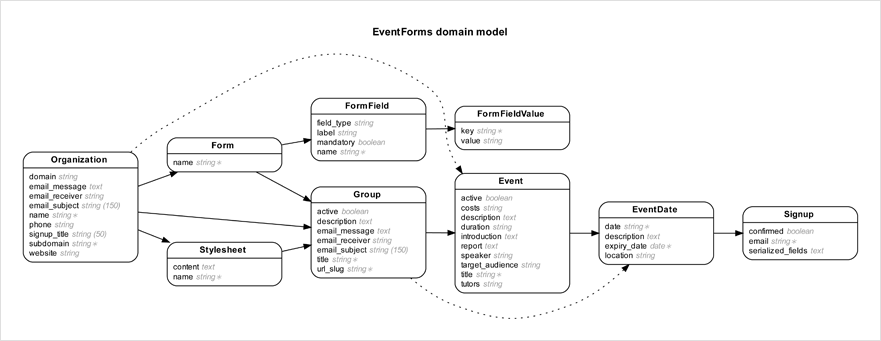
Browse the gallery for more example diagrams.
Requirements
- Ruby 3.1+
- ActiveRecord 7.0+
- Graphviz 2.22+ (optional - only needed for PDF/PNG output)
Getting started
See the installation instructions for a complete description of how to install Rails ERD. Here's a summary:
-
Add gem 'rails-erd', group: :development to your application's Gemfile
-
Run bundle exec erd
This generates a Mermaid diagram (erd.mmd) by default. Mermaid diagrams render natively in GitHub, GitLab, and many documentation tools.
For PDF/PNG output (optional):
-
Install Graphviz 2.22+ (how?). On macOS with Homebrew run
brew install graphviz, on Linux runsudo apt-get install graphviz. -
Add
gem 'ruby-graphviz'to your Gemfile -
Run
bundle exec erd --generator=graphviz --filetype=pdf
Configuration
Rails ERD has the ability to be configured via the command line or through the use of a YAML file with configuration options set. It will look for this file first at ~/.erdconfig and then ./.erdconfig (which will override any settings in ~/.erdconfig). More information on customization options can be found in Rails ERD's project documentation.
Here is an example .erdconfig showing the default values:
attributes:
  - content
disconnected: true
filename: erd
filetype: mmd
generator: mermaid
indirect: true
inheritance: false
markup: true
mermaid_style: erdiagram
notation: simple
orientation: horizontal
polymorphism: false
sort: true
warn: true
title: true
exclude: null
exclude_attributes: null
only: null
only_recursion_depth: null
prepend_primary: false
cluster: false
splines: spline
Hiding attributes for specific models
While attributes: false hides attributes for every model, exclude_attributes
lets you hide attributes for individual models without affecting the others. Map a
model name to true to hide all of its attributes, or to a list of attribute names
to hide only those:
exclude_attributes:
  BigTable: true            # hide all attributes for BigTable
  User:                     # hide only these attributes for User
    - password_digest
    - remember_token
From the command line, pass a comma separated list where each entry is either
Model (hide all of its attributes) or Model.attribute (hide a single one):
# rake task (bare key=value)
bundle exec rake erd exclude_attributes="BigTable,User.password_digest,User.remember_token"

# erd binary (flags require the -- prefix)
bundle exec erd --exclude_attributes="BigTable,User.password_digest,User.remember_token"
Filtering models with exclude and only
Use exclude to hide specific models from the diagram, or only to show only
specific models. Both options support three pattern types:
Exact match — the model name must match exactly (backward compatible):
exclude:
  - AdminUser
  - AuditLog
Glob patterns — use * to match any characters, ? for a single character,
or [...] for character classes. This is useful for excluding entire namespaces:
exclude:
  - "SolidQueue::*"      # all SolidQueue models (13+ tables)
  - "Blazer::*"          # all Blazer models
  - "ActiveStorage::*"   # all ActiveStorage models
  - "Ahoy::*"            # all Ahoy analytics models

only:
  - "MyApp::*"           # show only models in MyApp namespace
Regex patterns — wrap the pattern in /slashes/ for regular expression
matching. Supports i (case-insensitive), m (multiline), and x (extended) flags:
exclude:
  - "/^Active/"          # models starting with "Active"
  - "/Queue$/i"          # models ending with "Queue" (case-insensitive)
  - "/(Audit|Log)/"      # models containing "Audit" or "Log"
You can mix pattern types in the same configuration:
exclude:
  - "SolidQueue::*"      # glob: entire namespace
  - "/^Active/"          # regex: prefix match
  - InternalTool         # exact: specific model
Notes:
- Patterns with
*should be quoted in YAML to avoid parsing issues - Invalid regex patterns will raise an error — test your patterns first
- Only
i,m,xregex flags are supported; other flags are ignored - When both
excludeandonlyare specified,onlyis applied first, thenexclude
Grouping models by namespace
Use cluster: true to visually group models by their Ruby namespace. This is
especially useful for large applications with many namespaced models.
With Graphviz output, clustering creates subgraph boxes around each namespace:
bundle exec erd --generator=graphviz --cluster=true
With Mermaid classDiagram output, clustering uses Mermaid's native namespace blocks:
bundle exec erd --mermaid_style=classdiagram --cluster=true
This produces output like:
classDiagram
    namespace Admin {
        class User
        class Role
    }
    namespace Billing {
        class Invoice
        class Payment
    }
    User --> Role
    Invoice --> Payment
Note: Clustering is not supported with Mermaid's default erDiagram style
(ER diagrams don't have a namespace concept). If you need clustering with Mermaid,
use mermaid_style: classdiagram.
You can also customize fonts (useful if the defaults aren't available on your system):
fonts:
  normal: "Arial"
  bold: "Arial Bold"
  italic: "Arial Italic"
Note: The filename option can include a path to output the diagram to a specific directory:
filename: docs/erd
Or via command line:
bundle exec erd --filename="docs/erd"
Mermaid output (default)
Rails ERD generates Mermaid diagrams by default. Mermaid is a text-based diagramming format that renders natively in GitHub, GitLab, Notion, and many other tools.
By default, Mermaid output uses erDiagram syntax with crow's foot notation, PK/FK markers, and proper cardinality. You can switch to classDiagram syntax if preferred:
bundle exec erd --mermaid_style=classdiagram
Or in your .erdconfig:
mermaid_style: classdiagram
The default erDiagram style produces output like:
erDiagram
  User {
    integer id PK
    string name
    integer organization_id FK
  }
  Organization {
    integer id PK
    string name
  }
  Organization ||--o{ User : ""
tbls JSON output
Rails ERD can emit a JSON description of your domain in the
tbls schema format. Unlike a schema.rb
dump, this output captures the relationships Rails ERD derives from
ActiveRecord — so belongs_to associations show up as foreign keys even
when the database has no FK constraint.
Any tbls-compatible tool can consume the resulting file. For example, to render an interactive ERD with Liam ERD:
bundle exec erd --generator=tbls
# writes erd.json

npx @liam-hq/cli erd build --input erd.json --format tbls
Graphviz output
For PDF, PNG, or SVG output, you can use the Graphviz generator:
bundle exec erd --generator=graphviz --filetype=pdf
This requires:
- The
ruby-graphvizgem in your Gemfile - Graphviz installed on your system (
brew install graphvizorapt-get install graphviz)
Auto generation
- Run bundle exec rails g erd:install
- Run bundle exec rails db:migrate, then the diagram is generated
Using in a gem (without Rails)
If you want to use Rails ERD in a gem that defines ActiveRecord models but doesn't include Rails/Railties, you can use the API directly:
require 'rails_erd/diagram/mermaid'

# Ensure your models are loaded
require_relative 'lib/my_gem/models'

# Generate the diagram
RailsERD::Diagram::Mermaid.create
For Graphviz output:
require 'rails_erd/diagram/graphviz'
RailsERD::Diagram::Graphviz.create
You'll need to ensure your database connection is established and models are loaded before generating the diagram.
Learn more
More information can be found on Rails ERD's project homepage.
If you wish to extend or customise Rails ERD, take a look at the API documentation.
About Rails ERD
Rails ERD was created by Rolf Timmermans (r.timmermans at voormedia.com)
Copyright 2010-2026 Voormedia - www.voormedia.com
License
Rails ERD is released under the MIT license.