Rails ERD - Generate Entity-Relationship Diagrams for Rails applications


Rails ERD is a gem that allows you to easily generate a diagram based on your application's Active Record models. The diagram gives an overview of how your models are related. Having a diagram that describes your models is perfect documentation for your application.
The second goal of Rails ERD is to provide you with a tool to inspect your application's domain model. If you don't like the default output, it is very easy to use the API to build your own diagrams.
Rails ERD was created specifically for Rails and works on versions 6.0 and later (including Rails 7.x and 8.x). It uses Active Record's built-in reflection capabilities to figure out how your models are associated.
Preview
Here's an example entity-relationship diagram that was generated by Rails ERD:
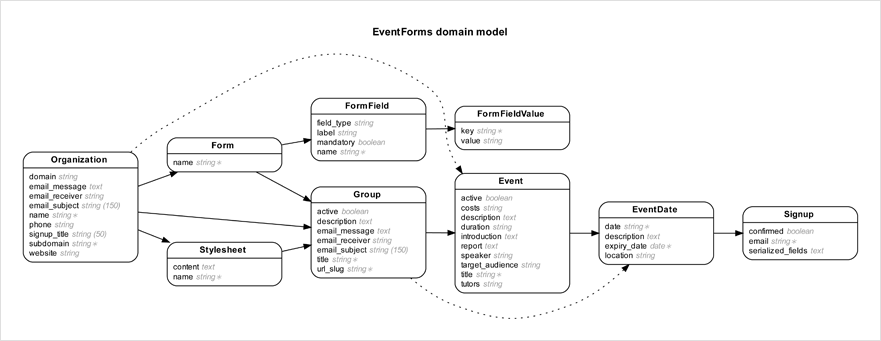
Browse the gallery for more example diagrams.
Requirements
- Ruby 3.1+
- ActiveRecord 7.0+
- Graphviz 2.22+ (optional - only needed for PDF/PNG output)
Getting started
See the installation instructions for a complete description of how to install Rails ERD. Here's a summary:
Add gem 'rails-erd', group: :development to your application's Gemfile
Run bundle exec erd
This generates a Mermaid diagram (erd.mmd) by default. Mermaid diagrams render natively in GitHub, GitLab, and many documentation tools.
For PDF/PNG output (optional):
Install Graphviz 2.22+ (how?). On macOS with Homebrew run
brew install graphviz, on Linux runsudo apt-get install graphviz.Add
gem 'ruby-graphviz'to your GemfileRun
bundle exec erd generator=graphviz filetype=pdf
Configuration
Rails ERD has the ability to be configured via the command line or through the use of a YAML file with configuration options set. It will look for this file first at ~/.erdconfig and then ./.erdconfig (which will override any settings in ~/.erdconfig). More information on customization options can be found in Rails ERD's project documentation.
Here is an example .erdconfig showing the default values:
attributes:
  - content
disconnected: true
filename: erd
filetype: mmd
generator: mermaid
indirect: true
inheritance: false
markup: true
mermaid_style: erdiagram
notation: simple
orientation: horizontal
polymorphism: false
sort: true
warn: true
title: true
exclude: null
only: null
only_recursion_depth: null
prepend_primary: false
cluster: false
splines: spline
You can also customize fonts (useful if the defaults aren't available on your system):
fonts:
  normal: "Arial"
  bold: "Arial Bold"
  italic: "Arial Italic"
Note: The filename option can include a path to output the diagram to a specific directory:
filename: docs/erd
Or via command line:
bundle exec erd filename="docs/erd"
Mermaid output (default)
Rails ERD generates Mermaid diagrams by default. Mermaid is a text-based diagramming format that renders natively in GitHub, GitLab, Notion, and many other tools.
By default, Mermaid output uses erDiagram syntax with crow's foot notation, PK/FK markers, and proper cardinality. You can switch to classDiagram syntax if preferred:
bundle exec erd mermaid_style=classdiagram
Or in your .erdconfig:
mermaid_style: classdiagram
The default erDiagram style produces output like:
erDiagram
  User {
    integer id PK
    string name
    integer organization_id FK
  }
  Organization {
    integer id PK
    string name
  }
  Organization ||--o{ User : ""
Graphviz output
For PDF, PNG, or SVG output, you can use the Graphviz generator:
bundle exec erd generator=graphviz filetype=pdf
This requires:
- The
ruby-graphvizgem in your Gemfile - Graphviz installed on your system (
brew install graphvizorapt-get install graphviz)
Auto generation
- Run bundle exec rails g erd:install
- Run bundle exec rails db:migrate, then the diagram is generated
Using in a gem (without Rails)
If you want to use Rails ERD in a gem that defines ActiveRecord models but doesn't include Rails/Railties, you can use the API directly:
require 'rails_erd/diagram/mermaid'

# Ensure your models are loaded
require_relative 'lib/my_gem/models'

# Generate the diagram
RailsERD::Diagram::Mermaid.create
For Graphviz output:
require 'rails_erd/diagram/graphviz'
RailsERD::Diagram::Graphviz.create
You'll need to ensure your database connection is established and models are loaded before generating the diagram.
Learn more
More information can be found on Rails ERD's project homepage.
If you wish to extend or customise Rails ERD, take a look at the API documentation.
About Rails ERD
Rails ERD was created by Rolf Timmermans (r.timmermans at voormedia.com)
Copyright 2010-2026 Voormedia - www.voormedia.com
License
Rails ERD is released under the MIT license.