twin


Sync configuration folders between two Macs from self-documenting Markdown files.
Sync entries are defined in Markdown files with YAML blocks — human-readable, self-documenting, and queryable via grubber. Selection is interactive via fzf, with a Markdown preview rendered by apex and optional post-sync actions on the target via mi.lan.
Why?
Sync-definitions in Markdown + YAML are three things at once:
- Human-readable. Plain Markdown, no twin-specific syntax to learn. The Markdown frame documents why a path is synced, not just what, so you can read your own sync-files in a year and still understand them.
- Machine-readable. The YAML blocks are queryable via grubber, so any tool (twin, but also future ones) can act on the same source of truth.
- AI-writable. LLMs handle Markdown + YAML well. You can ask an assistant to add new entries or refactor existing ones, and the result stays valid for both humans and grubber.
Screenshots
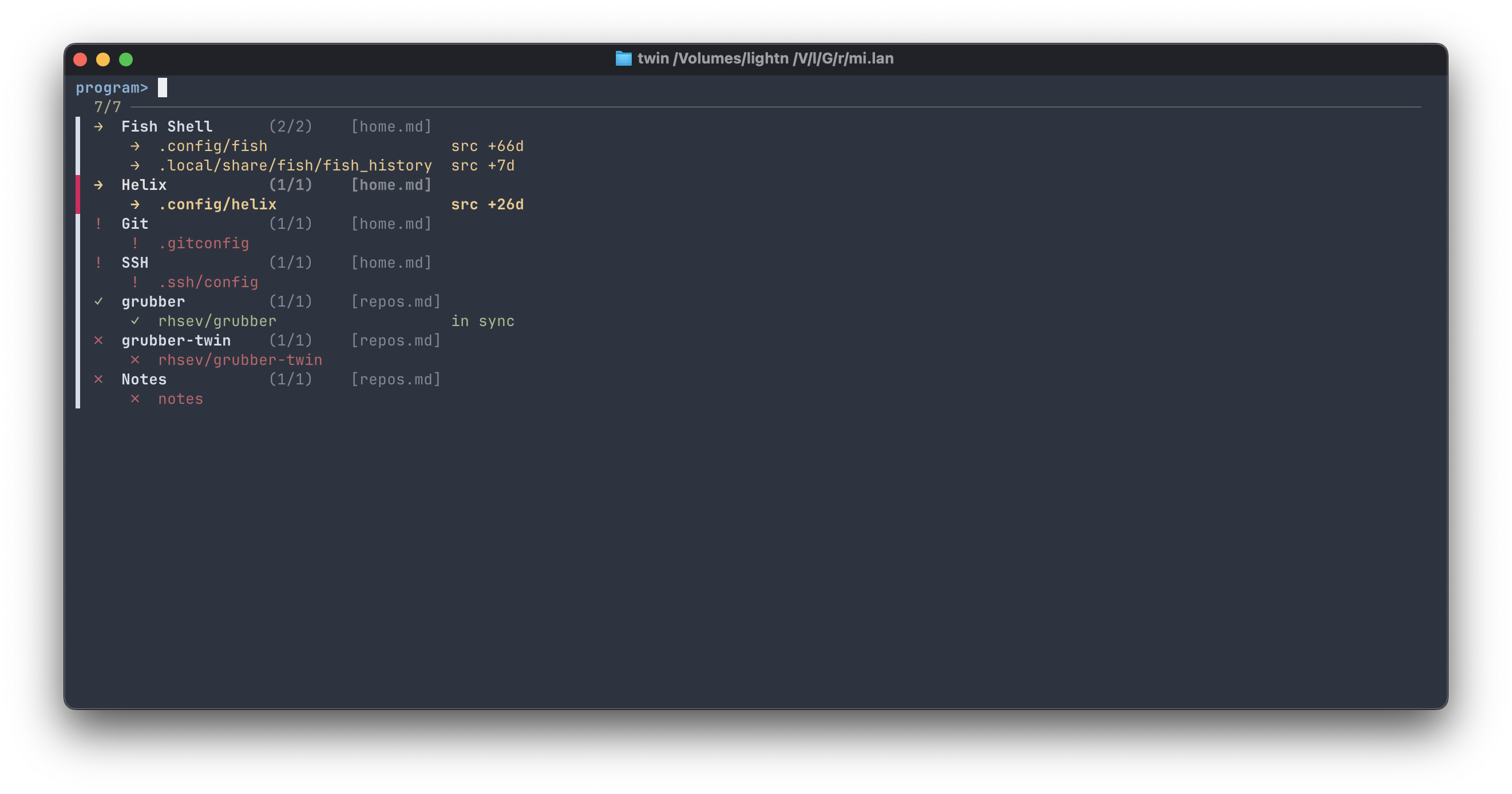
Stage 1 — program picker. One row per program, color-coded status, indented paths underneath:
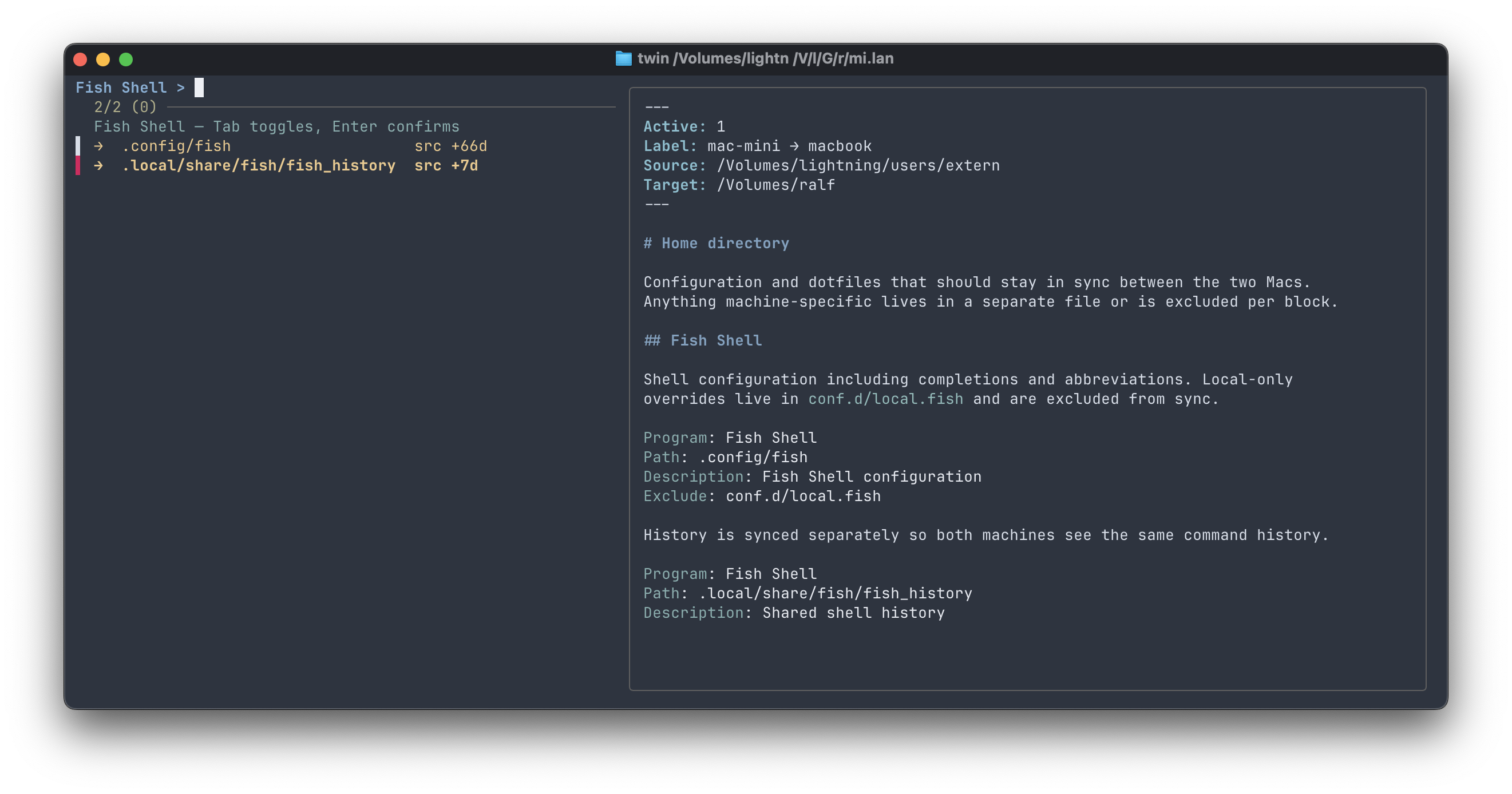
Stage 2 — multi-select over the paths of one program. The right pane shows a compact preview of the relevant sync-file section, rendered by apex:
Installation
1. Install grubber
twin parses sync-files via grubber, a
small Go binary. Download the latest release for your platform from
github.com/rhsev/grubber/releases
and put it somewhere in your PATH (e.g. /usr/local/bin/grubber).
2. Install twin
gem install mark-twin
Or from source:
git clone https://github.com/rhsev/mark-twin.git
cd mark-twin
gem build mark-twin.gemspec
gem install ./mark-twin-*.gem
3. Other tools
Also required in PATH: rsync (preinstalled on macOS), fzf
(brew install fzf). For the stage-2 preview, one of apex, glow,
or bat is recommended (falls back in that order; cat if none are
present).
Quickstart
Twin assumes the target machine is reachable as a mounted volume (typically via SMB or NFS). The mount check is enforced before any sync.
- Pick a directory for sync-files (anywhere; this example uses
~/Sync):
mkdir -p ~/Sync
- Create the config at
~/.config/twin/config.yaml:
   sync_dir: ~/Sync
   global_excludes:
     - .DS_Store
     - .git/
- Drop a sync-file into
~/Sync. The simplest starting point is to copy one of the examples and adapt the frontmatter:
   cp examples/home.md ~/Sync/
   $EDITOR ~/Sync/home.md   # edit Source: and Target:
- Run twin:
twin
Pick a program, then the paths to sync, hit Enter.
Usage
Twin has two modes: an interactive interface (default — see screenshots above) and CLI commands for status checks and batch sync.
twin                         # TUI — all programs across all sync-files
twin home.md                 # TUI — one sync-file in sync_dir (by name)
twin /abs/path/to/file.md    # TUI — any sync-file by absolute path
twin ./relative/dir/         # TUI — all sync-files in a directory
twin list                    # plain listing
twin status                  # listing with source/target mtimes
twin sync -p grubber         # sync one program by name pattern
twin sync --file=repos       # sync all programs from a sync-file
twin sync --dry-run          # preview without writing
twin doctor                  # check tools, renderers, and sync targets
twin --help                  # show usage
File argument resolution:
- bare name (no
/) → looked up by substring insync_dir - contains
/→ resolved as path (absolute or relative); file or directory both work
Configuration
~/.config/twin/config.yaml:
sync_dir: /path/to/sync-files

global_excludes:
  - .DS_Store
  - .git/

# Optional preview rendering (apex):
# apex_theme: default
# apex_width: 80
# apex_code_highlight: monokai
# apex_code_highlight_theme: dark
Environment overrides: TWIN_SYNC_DIR, TWIN_CONFIG, TWIN_HOST (which host
twin runs as — lets one config serve both machines).
Sync-files
Each Markdown file represents one sync relationship. Frontmatter defines the relationship (Source/Target); YAML blocks define individual paths.
See examples/home.md and examples/repos.md for ready-to-adapt templates.
Minimal example:
---
Active: 1
Label: mac-mini → macbook
Source: /Users/admin
Target: /Volumes/macbook/Users/admin
---

## Fish Shell

Configuration for the fish shell, including completions and abbreviations.

```yaml
Program: Fish Shell
Path: .config/fish
Description: Fish Shell configuration
Exclude: conf.d/local.fish
```
Frontmatter fields (Active, Label, Source, Target) are merged into
every block by grubber. Multiple blocks can share the same Program — twin
groups them and treats the program as the unit of selection.
The optional Cmd field runs an arbitrary shell command after a successful
sync — typically a curl to a local automation endpoint like
mi.lan to reload a program, restart a
service, or notify another machine. The command only runs when rsync actually
transferred bytes; no-op syncs skip it. See the Helix entry in
examples/home.md.
The optional Delete: true field adds --delete to the rsync invocation,
so files removed from the source are also removed on the target. Useful for
directory syncs where the target should mirror the source exactly.
Templating
Some configs differ per machine — a LaunchAgent plist that points at
/Volumes/lightning/… on one Mac and /Users/ralf/… on another, a
settings.json with a device-specific id. Those used to fall out of twin and
get hand-maintained. Templating folds them back into one source of truth.
Define a host table in ~/.config/twin/config.yaml:
host: mini          # which machine twin runs on
target: book        # the machine being synced to

hosts:
  mini: { home: /Volumes/lightning/users/extern, git: /Volumes/lightning/Git }
  book: { home: /Users/ralf, git: /Users/ralf/git, mount: /Volumes/ralf }
That exposes three sets of {{tokens}}, each with one fixed meaning:
| Token | Resolves to | Use in |
|---|---|---|
{{src.home}}, {{src.git}}, … |
the running host's own paths | Source: (read side) |
{{dst.mount}} |
where the target is mounted here (/Volumes/ralf) |
Target: (write side) |
{{dst.home}}, {{dst.git}}, … |
the target's native paths | rendered file content |
The distinction matters: a file written to the mount (/Volumes/ralf/…) but
read by the target machine must contain that machine's native paths
(/Users/ralf/…). {{dst.mount}} and {{dst.home}} keep the two apart.
Quote templated values.
{{at the start of a YAML value collides with YAML flow-mapping syntax, so writeSource: "{{src.home}}", notSource: {{src.home}}— exactly as in Ansible.
Render: true turns a block from copy into render: twin reads the source as a
template, substitutes {{…}} in its content, and writes the result only if
it differs from the current target (so a Cmd hook fires only on a real change).
Target-Path: overrides the target-side relative path when it differs from the
source layout:
## LiveSync LaunchAgent

```yaml
Program: livesync-agent
Source: "{{src.home}}/Automation/launchd"
Path: com.ralf.livesync.plist
Target: "{{dst.mount}}"
Target-Path: Library/LaunchAgents/com.ralf.livesync.plist
Render: true
Cmd: curl -s http://mi.lan/livesync-reload
```
twin doctor checks that every {{token}} across your sync-files resolves, and
twin status compares rendered output by content (not mtime). Without a hosts
table, templating is inert and literal-path sync-files behave exactly as before.
Design
Sync instructions and context in one place — the same Markdown file holds
both the Path: directives and the prose explaining them. No TUI framework:
fzf does the interactive part, apex the rendering.
See ARCHITECTURE.md for the data model and internals.
Tests
rake test