



About
llm.rb is the most capable runtime for building AI systems in Ruby.
llm.rb is designed for Ruby, and although it works great in Rails, it is not tightly
coupled to it. It runs on the standard library by default (zero dependencies),
loads optional pieces only when needed, includes built-in ActiveRecord support through
acts_as_llm and acts_as_agent, includes built-in Sequel support through
plugin :llm and plugin :agent, and is designed for engineers who want control over
long-lived, tool-capable, stateful AI workflows instead of just
request/response helpers.
It provides one runtime for providers, agents, tools, skills, MCP servers, streaming, schemas, files, and persisted state, so real systems can be built out of one coherent execution model instead of a pile of adapters.
Want to see some code? Jump to the examples section.
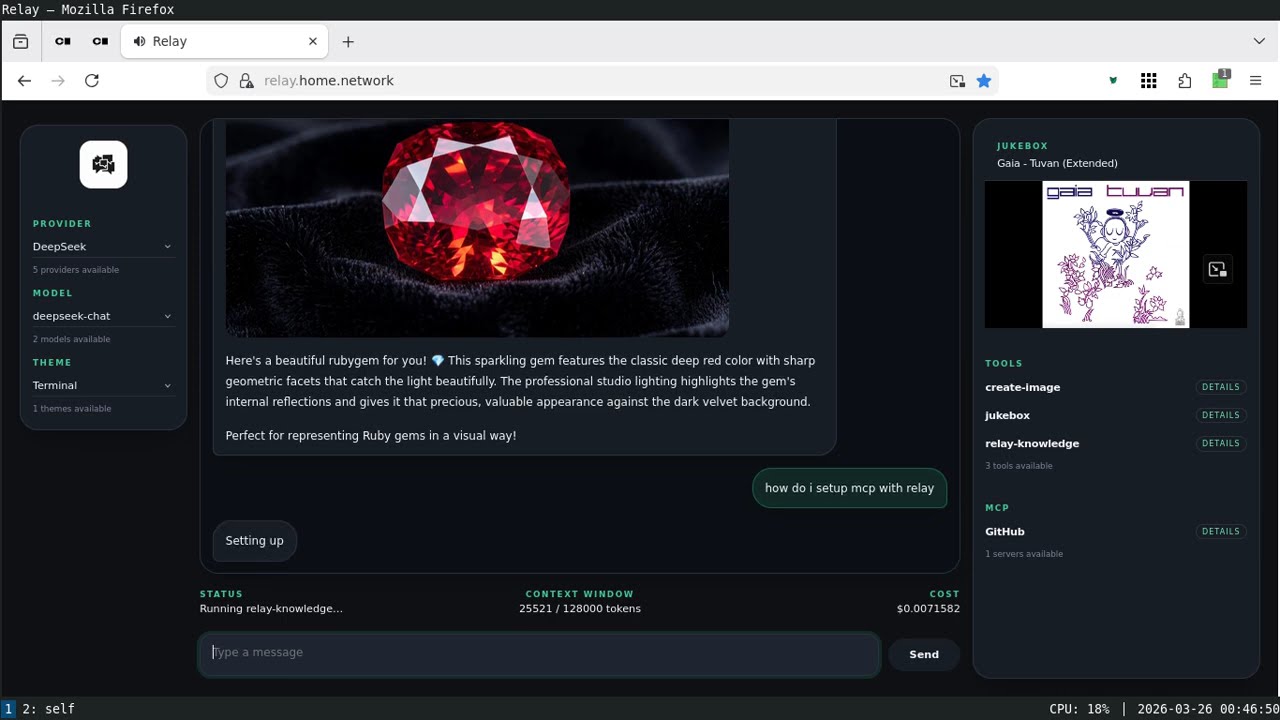
Want a taste of what llm.rb can build? See the screencast.
Architecture

Core Concept
LLM::Context
is the execution boundary in llm.rb.
It holds:
- message history
- tool state
- schemas
- streaming configuration
- usage and cost tracking
Instead of switching abstractions for each feature, everything builds on the same context object.
Standout features
The following list is not exhaustive, but it covers a lot of ground.
Skills
Skills are reusable, directory-backed capabilities loaded from SKILL.md.
They run through the same runtime as tools, agents, and MCP. They do not
require a second orchestration layer or a parallel abstraction. If you've
used Claude or Codex, you know the general idea of skills, and llm.rb
supports that same concept with the same execution model as the rest of the
system.
In llm.rb, a skill has frontmatter and instructions. The frontmatter can
define name, description, and tools. The tools entries are tool names,
and each name must resolve to a subclass of
LLM::Tool that is already
loaded in the runtime.
If you want Claude/Codex-like skills that can drive scripts or shell commands, you would typically pair the skill with a tool that can execute system commands.
---
name: release
description: Prepare a release
tools:
  - search_docs
  - git
---
Review the release state, summarize what changed, and prepare the release.
class Agent < LLM::Agent
  model "gpt-5.4-mini"
  skills "./skills/release"
end

llm = LLM.openai(key: ENV["KEY"])
Agent.new(llm, stream: $stdout).talk("Let's prepare the release!")
ORM
Any ActiveRecord model or Sequel model can become an agent-capable model, including existing business and domain models, without forcing you into a separate agent table or a second persistence layer.
acts_as_agent extends a model with agent capabilities: the same runtime
surface as LLM::Agent,
because it actually wraps an LLM::Agent, plus persistence through a text,
JSON, or JSONB-backed column on the same table.
class Ticket < ApplicationRecord
  acts_as_agent provider: :set_provider
  model "gpt-5.4-mini"
  instructions "You are a support assistant."

  private

  def set_provider
    { key: ENV["#{provider.upcase}_SECRET"], persistent: true }
  end
end
Agentic Patterns
llm.rb is especially strong when you want to build agentic systems in a Ruby way. Agents can be ordinary application models with state, associations, tools, skills, and persistence, which makes it much easier to build systems where users have their own specialized agents instead of treating agents as something outside the app.
That pattern works so well in llm.rb because
LLM::Agent,
acts_as_agent, plugin :agent, skills, tools, and persisted runtime state
all fit the same execution model. The runtime stays small enough that the
main design work becomes application design, not orchestration glue.
For a concrete example, see How to build a platform of agents.
Persistence
The same runtime can be serialized to disk, restored later, persisted in JSON or JSONB-backed ORM columns, resumed across process boundaries, or shared across long-lived workflows.
ctx = LLM::Context.new(llm)
ctx.talk("Remember that my favorite language is Ruby.")
ctx.save(path: "context.json")
LLM::Stream
LLM::Stream is not just for printing tokens. It supports on_content,
on_reasoning_content, on_tool_call, and on_tool_return, which means
visible output, reasoning output, and tool execution can all be driven through
the same execution path.
class Stream < LLM::Stream
  def on_tool_call(tool, error)
    queue << tool.spawn(:thread)
  end

  def on_tool_return(tool, result)
    puts(result.value)
  end
end
Concurrency
Tool execution can run sequentially with :call or concurrently through
:thread, :task, :fiber, and experimental :ractor, without rewriting
your tool layer.
class Agent < LLM::Agent
  model "gpt-5.4-mini"
  tools FetchWeather, FetchNews, FetchStock
  concurrency :thread
end
MCP
Remote MCP tools and prompts are not bolted on as a separate integration stack. They adapt into the same tool and prompt path used by local tools, skills, contexts, and agents.
begin
  mcp = LLM::MCP.http(url: "https://api.githubcopilot.com/mcp/").persistent
  mcp.start
  ctx = LLM::Context.new(llm, tools: mcp.tools)
ensure
  mcp.stop
end
Cancellation
Cancellation is one of the harder problems to get right, and while llm.rb makes it possible, it still requires careful engineering to use effectively. The point though is that it is possible to stop in-flight provider work cleanly through the same runtime, and the model used by llm.rb is directly inspired by Go's context package. In fact, llm.rb is heavily inspired by Go but with a Ruby twist.
ctx = LLM::Context.new(llm, stream: $stdout)
worker = Thread.new do
  ctx.talk("Write a very long essay about network protocols.")
rescue LLM::Interrupt
  puts "Request was interrupted!"
end
STDIN.getch
ctx.interrupt!
worker.join
Differentiators
Execution Model
- A system layer, not just an API wrapper
Put providers, tools, MCP servers, and application APIs behind one runtime model instead of stitching them together by hand. - Contexts are central
Keep history, tools, schema, usage, persistence, and execution state in one place instead of spreading them across your app. - Contexts can be serialized
Save and restore live state for jobs, databases, retries, or long-running workflows.
Runtime Behavior
- Streaming and tool execution work together
Start tool work while output is still streaming so you can hide latency instead of waiting for turns to finish. - Agents auto-manage tool execution
UseLLM::Agentwhen you want the same stateful runtime surface asLLM::Context, but with tool loops executed automatically according to a configured concurrency mode such as:call,:thread,:task,:fiber, or experimental:ractorsupport for class-based tools. MCP tools are not supported by the current:ractormode, but mixed tool sets can still route MCP tools and local tools through different strategies at runtime. - Tool calls have an explicit lifecycle
A tool call can be executed, cancelled throughLLM::Function#cancel, or left unresolved for manual handling, but the normal runtime contract is still that a model-issued tool request is answered with a tool return. - Requests can be interrupted cleanly
Stop in-flight provider work through the same runtime instead of treating cancellation as a separate concern.LLM::Context#cancel!is inspired by Go's context cancellation model. - Concurrency is a first-class feature
Use threads, fibers, async tasks, or experimental ractors without rewriting your tool layer. The current:ractormode is for class-based tools and does not support MCP tools, but mixed workloads can branch ontool.mcp?and choose a supported strategy per tool.:ractoris especially useful for CPU-bound tools, while:task,:fiber, or:threadmay be a better fit for I/O-bound work. - Advanced workloads are built in, not bolted on
Streaming, concurrent tool execution, persistence, tracing, and MCP support all fit the same runtime model.
Integration
- MCP is built in
Connect to MCP servers over stdio or HTTP without bolting on a separate integration stack. - ActiveRecord and Sequel persistence are built in
llm.rb includes built-in ActiveRecord support throughacts_as_llmandacts_as_agent, plus built-in Sequel support throughplugin :llmandplugin :agent. Useacts_as_llmwhen you want to wrapLLM::Context,acts_as_agentwhen you want to wrapLLM::Agent,plugin :llmwhen you want aLLM::Contexton a Sequel model, orplugin :agentwhen you want anLLM::Agent. These integrations supportprovider:andcontext:hooks, plusformat: :stringfor text columns orformat: :jsonbfor native PostgreSQL JSON storage when ORM JSON typecasting support is enabled. - ORM models can become persistent agents
Turn an ActiveRecord or Sequel model into an agent-capable model with built-in persistence, stored on the same table, withjsonbsupport when your ORM and database support native JSON columns. - Persistent HTTP pooling is shared process-wide
When enabled, separateLLM::Providerinstances with the same endpoint settings can share one persistent pool, and separate HTTPLLM::MCPinstances can do the same, instead of each object creating its own isolated per-instance transport. - OpenAI-compatible gateways are supported
Target OpenAI-compatible services such as DeepInfra and OpenRouter, as well as proxies and self-hosted servers, withhost:andbase_path:when they preserve OpenAI request shapes but change the API root path. - Provider support is broad
Work with OpenAI, OpenAI-compatible endpoints, Anthropic, Google, DeepSeek, Z.ai, xAI, llama.cpp, and Ollama through the same runtime. - Tools are explicit
Run local tools, provider-native tools, and MCP tools through the same path with fewer special cases. - Skills become bounded runtime capabilities
Point llm.rb at directories with aSKILL.md, resolve named tools through the registry, and adapt each skill into its own callable capability through the normal runtime. Unlike a generic skill-discovery tool, each skill runs with its own bounded tool subset and behaves like a task-scoped sub-agent. - Providers are normalized, not flattened
Share one API surface across providers without losing access to provider- specific capabilities where they matter. - Responses keep a uniform shape
Provider calls returnLLM::Responseobjects as a common base shape, then extend them with endpoint- or provider-specific behavior when needed. - Low-level access is still there
Normalized responses still keep the rawNet::HTTPResponseavailable when you need headers, status, or other HTTP details. - Local model metadata is included
Model capabilities, pricing, and limits are available locally without extra API calls.
Design Philosophy
- Runs on the stdlib
Start with Ruby's standard library and add extra dependencies only when you need them. - It is highly pluggable
Add tools, swap providers, change JSON backends, plug in tracing, or layer internal APIs and MCP servers into the same execution path. - It scales from scripts to long-lived systems
The same primitives work for one-off scripts, background jobs, and more demanding application workloads with streaming, persistence, and tracing. - Thread boundaries are clear
Providers are shareable. Contexts are stateful and should stay thread-local.
Capabilities
Execution:
- Chat & Contexts — stateless and stateful interactions with persistence
- Context Serialization — save and restore state across processes or time
- Streaming — visible output, reasoning output, tool-call events
- Request Interruption — stop in-flight provider work cleanly
- Concurrent Execution — threads, async tasks, and fibers
Runtime Building Blocks:
- Tool Calling — class-based tools and closure-based functions
- Run Tools While Streaming — overlap model output with tool latency
- Agents — reusable assistants with tool auto-execution
- Skills — directory-backed capabilities loaded from
SKILL.md - MCP Support — stdio and HTTP MCP clients with prompt and tool support
Data and Structure:
- Structured Outputs — JSON Schema-based responses
- Responses API — stateful response workflows where providers support them
- Multimodal Inputs — text, images, audio, documents, URLs
- Audio — speech generation, transcription, translation
- Images — generation and editing
- Files API — upload and reference files in prompts
- Embeddings — vector generation for search and RAG
- Vector Stores — retrieval workflows
Operations:
- Cost Tracking — local cost estimation without extra API calls
- Observability — tracing, logging, telemetry
- Model Registry — local metadata for capabilities, limits, pricing
- Persistent HTTP — optional connection pooling for providers and MCP
Installation
gem install llm.rb
Examples
REPL
This example uses LLM::Context directly for an interactive REPL.
See the deepdive (web) or deepdive (markdown) for more examples.
require "llm"

llm = LLM.openai(key: ENV["KEY"])
ctx = LLM::Context.new(llm, stream: $stdout)

loop do
  print "> "
  ctx.talk(STDIN.gets || break)
  puts
end
Agent
This example uses LLM::Agent directly and lets the agent manage tool execution.
See the deepdive (web) or deepdive (markdown) for more examples.
require "llm"

class ShellAgent < LLM::Agent
  model "gpt-5.4-mini"
  instructions "You are a Linux system assistant."
  tools Shell
  concurrency :thread
end

llm = LLM.openai(key: ENV["KEY"])
agent = ShellAgent.new(llm)
puts agent.talk("What time is it on this system?").content
Skills
This example uses LLM::Agent with directory-backed skills so SKILL.md capabilities run through the normal tool path. In llm.rb, a skill is exposed as a tool in the runtime. When that tool is called, it spawns a sub-agent with relevant context plus the instructions and tool subset declared in its own SKILL.md.
See the deepdive (web) or deepdive (markdown) for more examples.
Each skill runs only with the tools declared in its own frontmatter.
require "llm"

class Agent < LLM::Agent
  model "gpt-5.4-mini"
  instructions "You are a concise release assistant."
  skills "./skills/release", "./skills/review"
end

llm = LLM.openai(key: ENV["KEY"])
puts Agent.new(llm).talk("Use the review skill.").content
Streaming
This example uses LLM::Stream directly so visible output and tool execution can happen together.
See the deepdive (web) or deepdive (markdown) for more examples.
require "llm"

class Stream < LLM::Stream
  def on_content(content)
    $stdout << content
  end

  def on_tool_call(tool, error)
    return queue << error if error
    $stdout << "\nRunning tool #{tool.name}...\n"
    queue << tool.spawn(:thread)
  end

  def on_tool_return(tool, result)
    if result.error?
      $stdout << "Tool #{tool.name} failed\n"
    else
      $stdout << "Finished tool #{tool.name}\n"
    end
  end
end

llm = LLM.openai(key: ENV["KEY"])
ctx = LLM::Context.new(llm, stream: Stream.new, tools: [System])

ctx.talk("Run `date` and `uname -a`.")
ctx.talk(ctx.wait(:thread)) while ctx.functions.any?
Reasoning
This example uses LLM::Stream with the OpenAI Responses API so reasoning output is streamed separately from visible assistant output. See the deepdive (web) or deepdive (markdown) for more examples.
require "llm"

class Stream < LLM::Stream
  def on_content(content)
    $stdout << content
  end

  def on_reasoning_content(content)
    $stderr << content
  end
end

llm = LLM.openai(key: ENV["KEY"])
ctx = LLM::Context.new(
  llm,
  model: "gpt-5.4-mini",
  mode: :responses,
  reasoning: {effort: "medium"},
  stream: Stream.new
)
ctx.talk("Solve 17 * 19 and show your work.")
Request Cancellation
Need to cancel a stream? llm.rb has you covered through LLM::Context#interrupt!.
See the deepdive (web) or deepdive (markdown) for more examples.
require "llm"
require "io/console"

llm = LLM.openai(key: ENV["KEY"])
ctx = LLM::Context.new(llm, stream: $stdout)

worker = Thread.new do
  ctx.talk("Write a very long essay about network protocols.")
end

STDIN.getch
ctx.interrupt!
worker.join
Sequel (ORM)
The plugin :llm integration wraps LLM::Context on a Sequel::Model and keeps tool execution explicit.
See the deepdive (web) or deepdive (markdown) for more examples.
require "llm"
require "net/http/persistent"
require "sequel"
require "sequel/plugins/llm"

class Context < Sequel::Model
  plugin :llm, provider: -> { { key: ENV["#{provider.upcase}_SECRET"], persistent: true } }
end

ctx = Context.create(provider: "openai", model: "gpt-5.4-mini")
ctx.talk("Remember that my favorite language is Ruby")
puts ctx.talk("What is my favorite language?").content
ActiveRecord (ORM): acts_as_llm
The acts_as_llm method wraps LLM::Context and
provides full control over tool execution.
See the deepdive (web) or deepdive (markdown) for more examples.
require "llm"
require "net/http/persistent"
require "active_record"
require "llm/active_record"

class Context < ApplicationRecord
  acts_as_llm provider: -> { { key: ENV["#{provider.upcase}_SECRET"], persistent: true } }
end

ctx = Context.create!(provider: "openai", model: "gpt-5.4-mini")
ctx.talk("Remember that my favorite language is Ruby")
puts ctx.talk("What is my favorite language?").content
ActiveRecord (ORM): acts_as_agent
The acts_as_agent method wraps LLM::Agent and
manages tool execution for you.
See the deepdive (web) or deepdive (markdown) for more examples.
require "llm"
require "net/http/persistent"
require "active_record"
require "llm/active_record"

class Ticket < ApplicationRecord
  acts_as_agent provider: :set_provider
  model "gpt-5.4-mini"
  instructions "You are a concise support assistant."
  tools SearchDocs, Escalate
  concurrency :thread

  private

  def set_provider
    { key: ENV["#{provider.upcase}_SECRET"], persistent: true }
  end
end

ticket = Ticket.create!(provider: "openai", model: "gpt-5.4-mini")
puts ticket.talk("How do I rotate my API key?").content
MCP
This example uses LLM::MCP over HTTP so remote GitHub MCP tools run through the same LLM::Context tool path as local tools. See the deepdive (web) or deepdive (markdown) for more examples.
require "llm"
require "net/http/persistent"

llm = LLM.openai(key: ENV["KEY"])
mcp = LLM::MCP.http(
  url: "https://api.githubcopilot.com/mcp/",
  headers: {"Authorization" => "Bearer #{ENV.fetch("GITHUB_PAT")}"}
).persistent

begin
  mcp.start
  ctx = LLM::Context.new(llm, stream: $stdout, tools: mcp.tools)
  ctx.talk("Pull information about my GitHub account.")
  ctx.talk(ctx.call(:functions)) while ctx.functions.any?
ensure
  mcp.stop
end
Screencast
This screencast was built on an older version of llm.rb, but it still shows how capable the runtime can be in a real application:
Resources
- deepdive (web) and deepdive (markdown) are the examples guide.
- relay shows a real application built on top of llm.rb.
- doc site has the API docs.