
leakferret (Ruby gem)
MCP-native secret scanner — verified findings, agent-applied rewrites.


Ruby gem wrapper around the native leakferret
binary. This gem ships no scanning logic of its own: it installs a tiny Ruby
shim plus the prebuilt, statically-linked engine (written in Rust). All the
work — scan, classify, verify, rewrite — happens in that single binary.
You get a precompiled platform gem with the binary bundled inside it, the
same way nokogiri and sorbet-static ship their native code, for x86_64
Linux (glibc), macOS (x86_64 and arm64), and x86_64 Windows. The binary travels
through RubyGems with the gem — no download, no network access, no Rust
toolchain — and you can audit exactly what you will run with
gem unpack leakferret. The gem has no fetch-and-run code at all. On any
other platform the source gem installs and points you at a one-line fix (build
from source, or set LEAKFERRET_BIN); it never downloads a binary.
What leakferret does
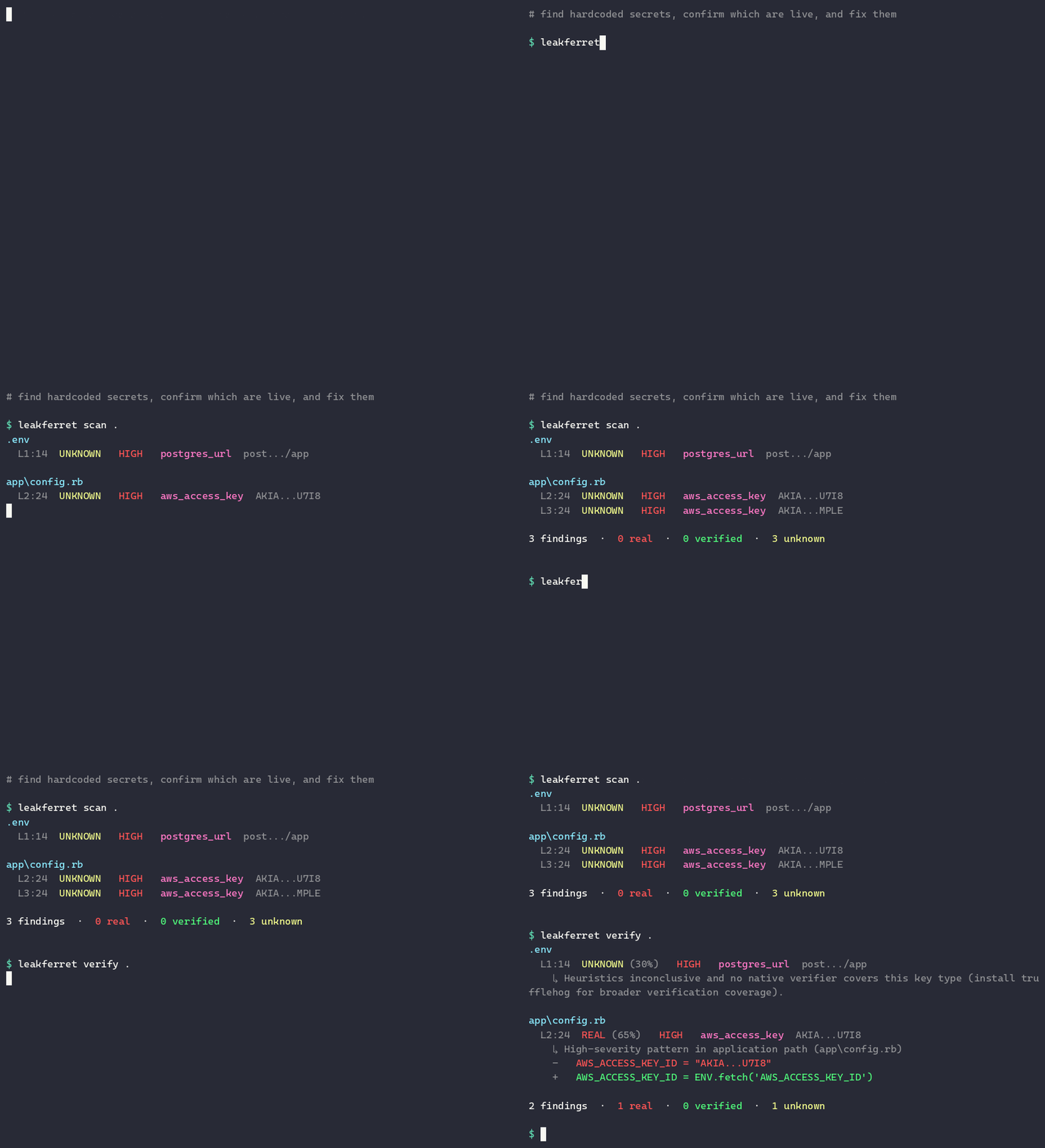
leakferret finds hardcoded secrets and API keys in your code and helps you remove them, in five stations:
- Scan — regex pre-filter over files; respects
.gitignoreand also reads dotfiles like.env. - Catalog — a signed database of known-public example credentials (Stripe
test keys,
AKIAIOSFODNN7EXAMPLE, jwt.io samples) so documented examples are markedFIXTUREinstead of false-alarming. - Classify — a
REAL/FIXTURE/UNKNOWNverdict, from offline heuristics or by asking the host editor/agent language model (no extra API key, no cost). - Verify — a real but harmless API call to the provider (AWS SigV4, GitHub, GitLab, Stripe, OpenAI, Anthropic, Slack, Twilio, SendGrid, Mailgun, Datadog, Heroku, npm, PyPI, DigitalOcean) to confirm a key is live, plus a trufflehog fallback.
- Rewrite — swap a hardcoded literal for an environment-variable lookup
(
ENV.fetchin Ruby,process.envin JS,os.environin Python), add a.env.exampleline, and print secret-manager seed commands.
Privacy invariant: the full secret value never leaves your machine. Only a
redacted first-4-plus-last-4 preview (e.g. AKIA...4XYZ) is ever written to a
report, log, network message, or model prompt. Verification calls go straight
from your machine to the provider — leakferret has no servers.
Install
gem install leakferret
RubyGems and Bundler select the right precompiled gem for your platform
automatically, so the binary is already there after gem install — no
first-run download. Inspect it before you trust it:
gem unpack leakferret # the bundled binary is at lib/leakferret/bin/
Released gems carry GitHub build provenance (SLSA), so you can verify each gem
was built from the tagged source in CI. On a platform without a prebuilt binary
(e.g. aarch64-linux or Alpine/musl), the source gem still installs — so
bundle install resolves — and tells you to build from source
(cargo install leakferret-cli) or set LEAKFERRET_BIN. It never downloads.
Add it to a Gemfile for project-local use:
gem 'leakferret'
Requires Ruby >= 3.1.
CLI
The gem installs a leakferret executable that simply execs the binary, so
every subcommand and flag works exactly as upstream:
leakferret scan .
leakferret verify . --only-verified
leakferret rewrite . --apply --backend doppler
leakferret baseline init
leakferret catalog info
leakferret mcp                 # MCP server on stdio
leakferret scan --git walks commit history. Output formats are pretty
(colored terminal), json, and sarif (for GitHub Code Scanning).
Ruby API
require 'leakferret'

# Regex pre-filter only.
findings = Leakferret.scan('.')

# + provider-verified (live HTTP to GitHub / Stripe / AWS / ...).
findings = Leakferret.verify('.', mode: 'only-verified')

# + propose rewrites for REAL findings.
findings = Leakferret.rewrite('.', backend: 'doppler')

# Apply rewrites in place.
Leakferret.rewrite('.', apply: true)
Each Finding is a hash with path, line, column, pattern, severity
(critical/high/medium/low), verdict (real/fixture/unknown),
match_redacted, confidence, verification, and fingerprint.
Rewrite a leak
rewrite turns a hardcoded secret into an env-var lookup and helps you move it
into a secret manager:
leakferret rewrite . --dry-run-diff               # preview the change, touch nothing
leakferret rewrite . --apply                      # write `ENV.fetch("KEY")` in place + add to .env.example
leakferret rewrite . --apply --backend doppler    # also print seed commands for your manager
--backend accepts env (default), vault, doppler, aws-secrets-manager,
infisical. By default it only rewrites findings confirmed REAL/live; add
--include-unknown to also fix unconfirmed candidates.
Use it in CI
leakferret is one binary with clear exit codes (0 = clean, 1 = findings), so
it drops into any CI. The recommended pattern: baseline once, then verify
on every build so you only fail on new secrets.
# One-time, on a repo that may already have findings:
leakferret baseline init            # fingerprints current findings (HMAC, never the raw secret)
git add .leakferret-baseline.json   # commit it — the per-repo salt is auto-gitignored
After that, verify ignores anything in the baseline and fails only on new leaks.
GitHub Actions — use the dedicated action (uploads SARIF to Code Scanning):
- uses: leakferrethq/leakferret-action@v1
  with: { path: ., fail-on: any }
CircleCI:
jobs:
  secrets:
    docker: [{ image: cimg/ruby:3.3 }]
    steps:
      - checkout
      - run: gem install leakferret
      - run: leakferret verify . --format sarif > leakferret.sarif
      - store_artifacts: { path: leakferret.sarif }
GitLab CI / Argo Workflows / Jenkins / anything else — identical recipe:
gem install leakferret
leakferret verify .                 # exits 1 on any REAL finding -> fails the job
Useful flags: --only-verified (fail only on provider-confirmed live keys),
--verify-mode ever-verified (with a baseline, fail on anything that ever
verified live), --format sarif|json.
Use it with AI agents (MCP)
leakferret is also an MCP server, so a coding agent (Cursor, Claude, Continue) can scan, verify, and rewrite before it commits. Add it to your editor's MCP config:
{
  "mcpServers": {
    "leakferret": { "command": "leakferret", "args": ["mcp"] }
  }
}
In Cursor: Settings → MCP → Add. In Claude Desktop: the mcpServers
block of claude_desktop_config.json. Tools exposed: scan_repository,
classify_candidates, verify_finding, propose_rewrite, baseline_diff.
Running
leakferret mcpdirectly in a terminal looks like it hangs — that's correct. It's a stdio JSON-RPC server waiting for your editor to connect, not a command you run by hand.
Using a local binary
Every leakferret wrapper honors the LEAKFERRET_BIN environment variable. Point
it at a binary on disk and the wrapper runs that instead of the downloaded copy:
export LEAKFERRET_BIN=/opt/leakferret/leakferret
leakferret scan .
For air-gapped or offline installs, set LEAKFERRET_SKIP_DOWNLOAD=1 to skip the
release download and position the binary yourself.
Block commits locally (pre-commit hook)
Catch a secret before it is ever committed. From your repo root:
cat > .git/hooks/pre-commit <<'HOOK'
#!/bin/sh
# Offline secret scan (no network). Blocks the commit on any finding.
leakferret verify . --verify-mode none --fail-on any || {
  echo "leakferret blocked this commit. Bypass: git commit --no-verify"
  exit 1
}
HOOK
chmod +x .git/hooks/pre-commit
--verify-mode none keeps it offline; --fail-on any exits non-zero on any
non-fixture finding (documented examples like AKIAIOSFODNN7EXAMPLE are still
ignored). Pair with leakferret baseline init to block only on new secrets,
or commit the hook to .githooks/ and run git config core.hooksPath .githooks
to share it with a team.
License
MIT for this gem and the bundled binary. The fixture catalog data is
CC-BY-SA-4.0 — see leakferret-catalog.
Part of leakferret · leakferret.com · maintained by Maria Khan <missusk@protonmail.com>.