Jquard
Build modern admin panels and apps in Ruby on Rails with a few lines of code.
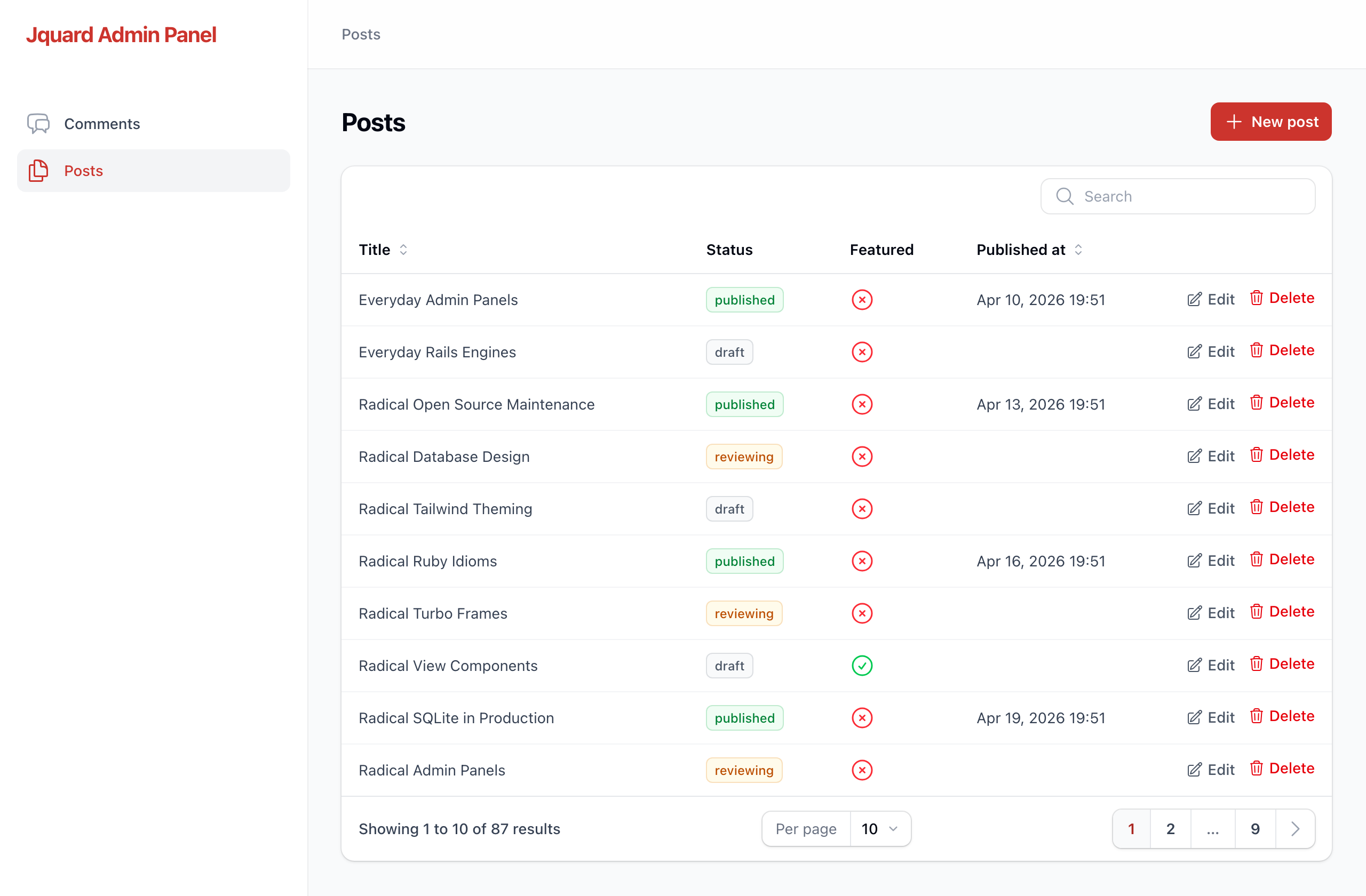
Jquard is a mountable Rails engine, inspired by Filament from the Laravel ecosystem. With Jquard, you can describe your models with a chainable Ruby DSL and get searchable, sortable, and paginated tables — styled with Tailwind and Heroicons, and driven by Rails defaults.
The built-in generator reads your models and writes the first version for you, so you never start from a blank file.
What you get
- Tables with search, sortable columns, pagination, status badges, and boolean icons.
- Forms for creating and editing records, with section layouts, validation errors, and a "Saved" toast.
- Row actions — edit, and delete with a confirmation dialog (not the browser's gray popup).
- A generator that turns a model into a working resource in one command.
- Theming — set a brand name and a primary color; the whole panel follows it.
No JavaScript build step, no Tailwind config in your app. Jquard ships its own compiled CSS.
Requirements
- Rails 8.0 or newer
- Ruby 3.2 or newer
- Hotwire (
turbo-rails, included with new Rails apps)
Getting started
Say you already have a Comment model in your app:
# app/models/comment.rb
class Comment < ApplicationRecord
  validates :author_name, presence: true
end
backed by a table like this:
create_table :comments do |t|
t.string :author_name, null: false
t.text :body
t.boolean :approved, null: false, default: false
t.datetime :posted_at
t.
end
Here's how to put it in an admin panel.
1. Install the gem
Add it to your Gemfile:
gem "jquard"
Then run the install generator. It mounts the engine at /admin and creates a config file:
$ bundle install
$ bin/rails generate jquard:install
2. Generate a resource for your model
$ bin/rails generate jquard:resource Comment
3. Open /admin
That's it. You have a Comments table you can search and sort, a form to create new comments, and edit and delete on every row. The author_name column is searchable because it's a string; approved shows a check or a cross because it's a boolean; posted_at is formatted as a date. Jquard picked those from your database columns.
What the generator wrote
The generator created a small folder of plain Ruby files. This is your code now — edit any of it.
app/jquard/resources/comments/
├── comment_resource.rb          # ties the model, table, form, and pages together
├── tables/comments_table.rb     # the columns shown in the list
├── schemas/comment_form.rb       # the fields shown in the create/edit form
└── pages/
    ├── list_comments.rb
    ├── create_comment.rb
    └── edit_comment.rb
The table it wrote:
# app/jquard/resources/comments/tables/comments_table.rb
module Jquard
  module Resources
    module Comments
      module Tables
        class CommentsTable
          include Jquard::Tables::Components

          def self.configure(table)
            table
              .columns([
                TextColumn.make(:author_name).searchable.sortable,
                IconColumn.make(:approved).boolean,
                TextColumn.make(:posted_at).date_time.sortable
              ])
              .record_actions([ EditAction.make, DeleteAction.make ])
              .default_sort(:created_at, :desc)
          end
        end
      end
    end
  end
end
And the form:
# app/jquard/resources/comments/schemas/comment_form.rb
module Jquard
  module Resources
    module Comments
      module Schemas
        class CommentForm
          include Jquard::Schemas::Components

          def self.configure(schema)
            schema.components([
              Section.make("Details").columns(2).schema([
                TextInput.make(:author_name).required,
                Textarea.make(:body).rows(6).column_span_full,
                Toggle.make(:approved),
                DateTimePicker.make(:posted_at)
              ])
            ])
          end
        end
      end
    end
  end
end
Every line maps to something you can see on screen. Read the next section to change any of it.
Customizing
Table columns
Each column starts with .make(:attribute) and reads left to right:
table.columns([
  TextColumn.make(:title).searchable.sortable,
  TextColumn.make(:status)
    .badge
    .color(draft: :gray, reviewing: :warning, published: :success),
  IconColumn.make(:featured).boolean,
  TextColumn.make(:published_at).date_time.sortable
])
.searchable— this column is matched by the search box..sortable— the header becomes a sort toggle..badge— render the value as a pill;.color(...)maps values to colors..boolean— (onIconColumn) show a check for true, a cross for false..date_time— format a timestamp; pass a format string like.date_time("%Y-%m-%d")to change it.
Form fields
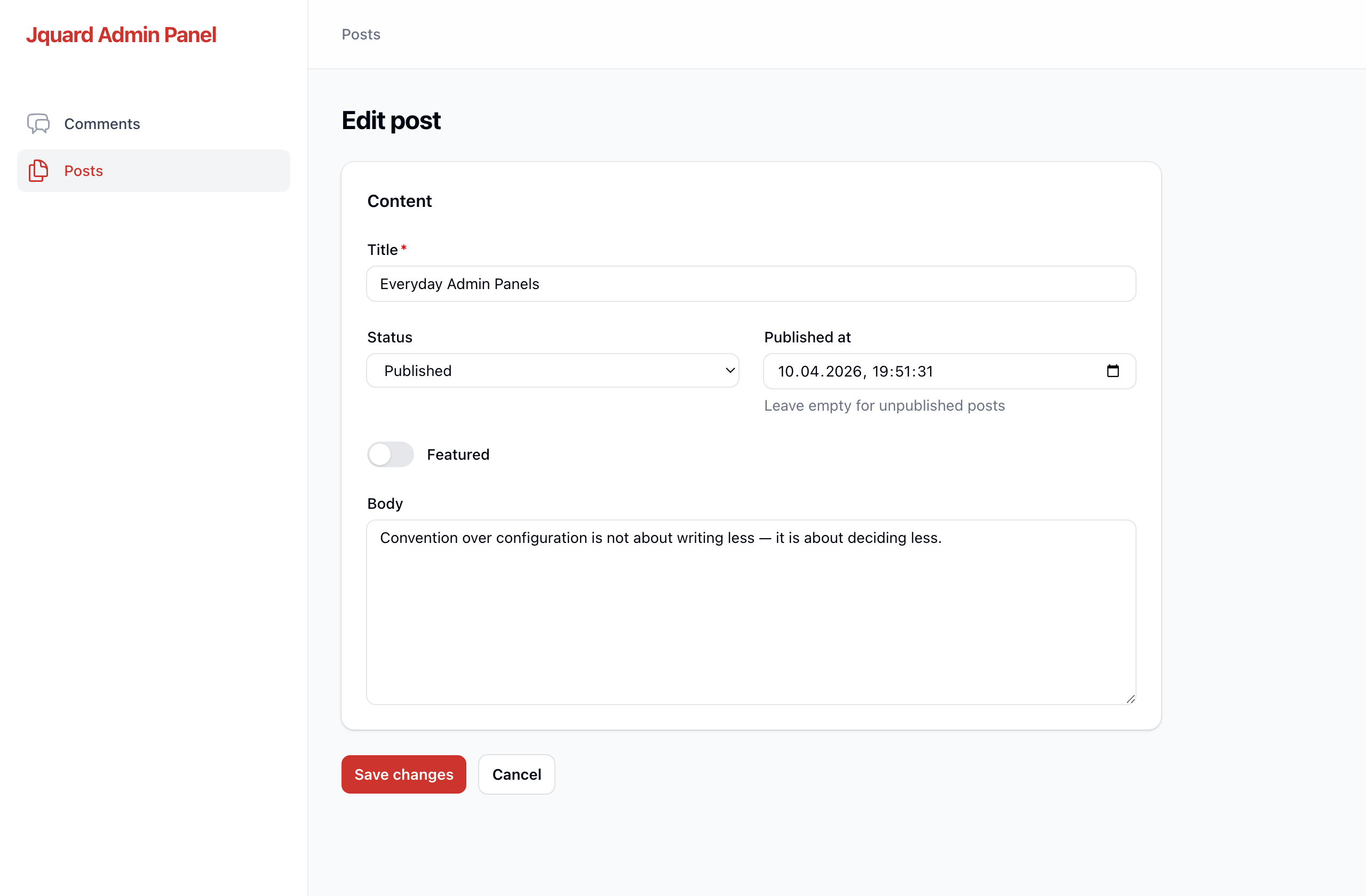
Fields live inside layout sections. A Section is a titled card; .columns(2) arranges its fields in two columns, and .column_span_full makes one field span the whole width.
schema.components([
Section.make("Content").columns(2).schema([
TextInput.make(:title).required.max_length(255).column_span_full,
Select.make(:status).(draft: "Draft", reviewing: "Reviewing", published: "Published"),
DateTimePicker.make(:published_at).helper_text("Leave empty for unpublished posts"),
Toggle.make(:featured),
Textarea.make(:body).rows(8).column_span_full
])
])
Available fields: TextInput (with .email, .password, .numeric variants), Textarea, Select, Checkbox, Toggle, DatePicker, DateTimePicker, Hidden. Shared options include .required, .placeholder, .helper_text, .default, and .disabled.
Row actions
record_actions decides the buttons on each row. Delete shows a confirmation dialog you can word yourself:
table.record_actions([
EditAction.make,
DeleteAction.make
.confirm_heading("Delete this comment?")
.confirm("This can't be undone.")
.("Yes, delete")
])
The resource file
comment_resource.rb is the hub. It names the model and hands the table and form to the classes above:
class CommentResource < Jquard::Resource
self.model = ::Comment
self. = "chat-bubble-left-right" # any Heroicon name
def self.form(schema)
Schemas::CommentForm.configure(schema)
end
def self.table(table)
Tables::CommentsTable.configure(table)
end
end
Theming
The install generator wrote config/initializers/jquard.rb:
Jquard.configure do |config|
  config.brand_name = "My App"

  # A built-in palette name...
  config.primary_color = :ruby

  # ...or a full set of shades:
  # config.primary_color = {
  #   50 => "#eff6ff", 100 => "#dbeafe", 200 => "#bfdbfe", 300 => "#93c5fd",
  #   400 => "#60a5fa", 500 => "#3b82f6", 600 => "#2563eb", 700 => "#1d4ed8",
  #   800 => "#1e40af", 900 => "#1e3a8a", 950 => "#172554"
  # }
end
The brand name shows in the sidebar; the primary color is used for buttons, links, the active nav item, and form focus rings.
How it works
- Resources register themselves. Any class under
app/jquard/resources/that inherits fromJquard::Resourceshows up in the panel — no central list to maintain. - State lives in the URL. Search, sort, and page are query parameters, so every view is shareable and survives a refresh.
- Hotwire drives the updates. Searching, sorting, and paging swap the table in place through a Turbo Frame instead of reloading the page.
For the design decisions and the full roadmap, see docs/DESIGN.md.
Status
Jquard is early. Today it covers the core admin panel: list, create, edit, and delete, plus the generator. Planned next: authentication, authorization, a read-only view page, relation managers, custom and bulk actions, and a dashboard. It follows semantic versioning.
Development
The repo includes a dummy Rails app under test/dummy that mounts the engine.
$ bin/rails test        # run the test suite
$ bundle exec rubocop   # lint
Contributing
Bug reports and pull requests are welcome on GitHub at https://github.com/jquard/jquard.
License
Jquard is open source under the MIT License.
It ships with Heroicons by Tailwind Labs, also MIT licensed — see lib/jquard/icons/LICENSE.