twin


Sync configuration folders between two Macs from self-documenting Markdown files.
Sync entries are defined in Markdown files with YAML blocks — human-readable, self-documenting, and queryable via grubber. Selection is interactive via fzf, with a Markdown preview rendered by apex.
Why?
Sync-definitions in Markdown + YAML are three things at once:
- Human-readable. Plain Markdown, no twin-specific syntax to learn. The Markdown frame documents why a path is synced, not just what, so you can read your own sync-files in a year and still understand them.
- Machine-readable. The YAML blocks are queryable via grubber, so any tool (twin, but also future ones) can act on the same source of truth.
- AI-writable. LLMs handle Markdown + YAML well. You can ask an assistant to add new entries or refactor existing ones, and the result stays valid for both humans and grubber.
Screenshots
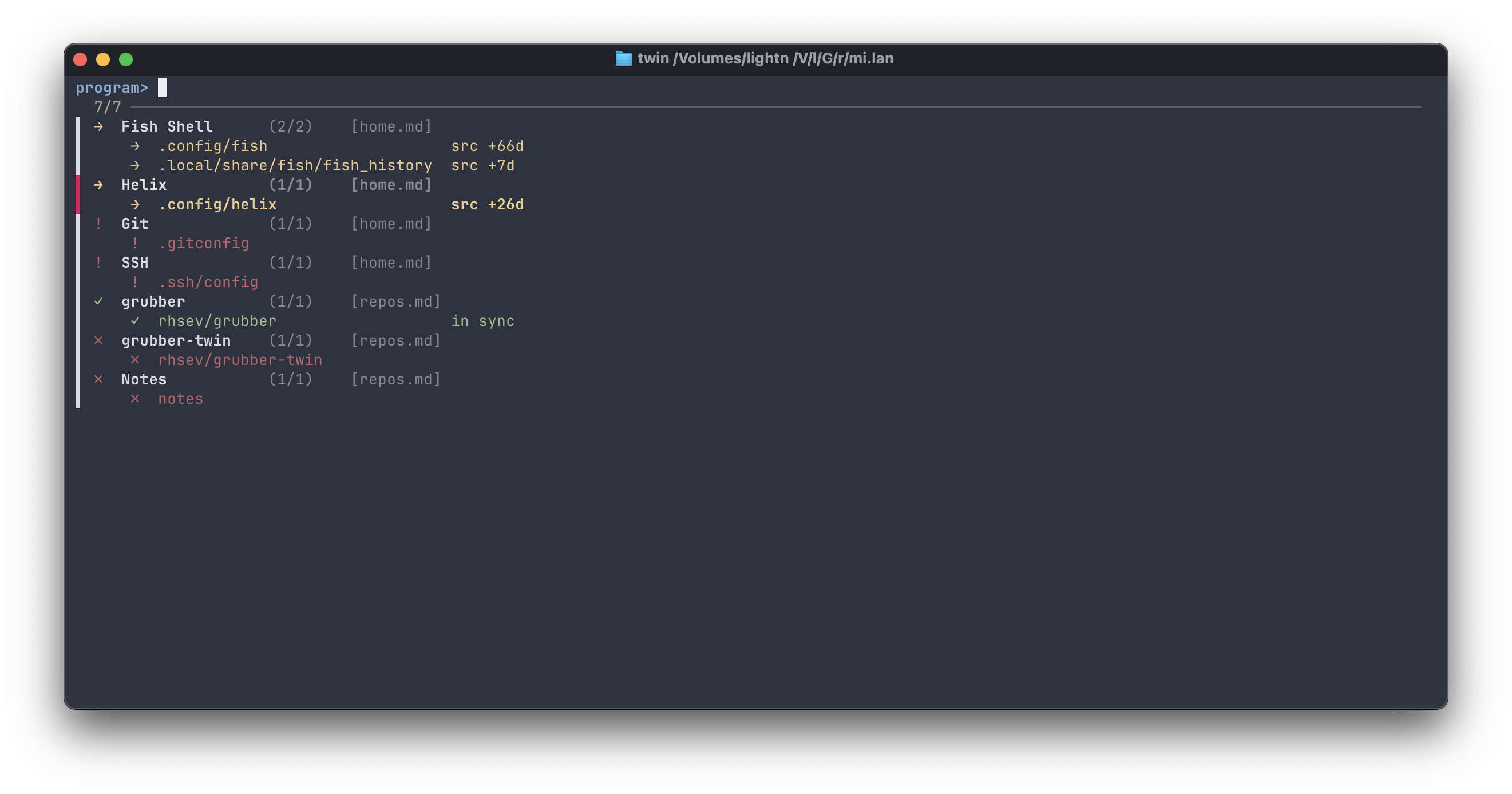
Stage 1 — program picker. One row per program, color-coded status, indented paths underneath:
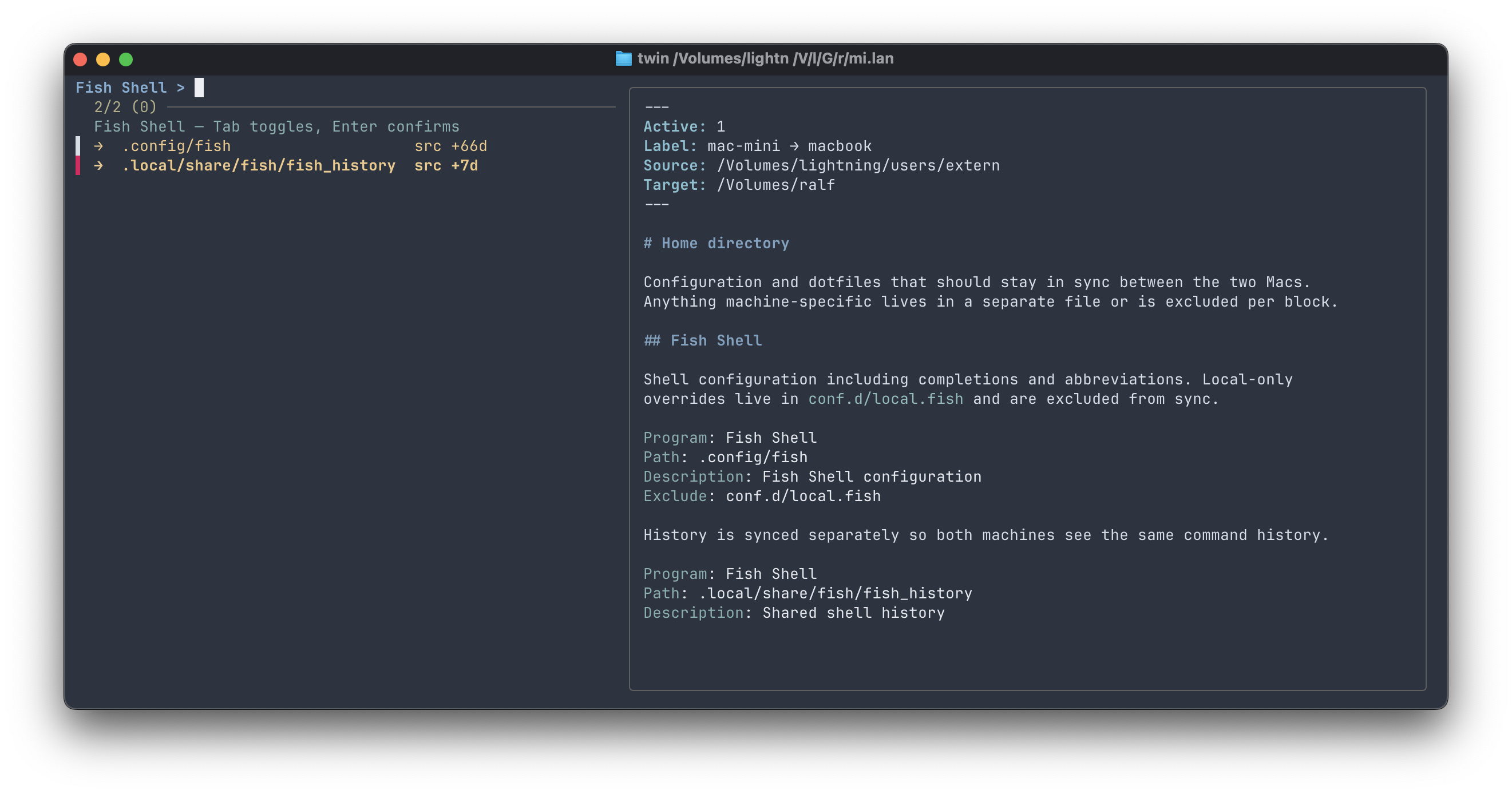
Stage 2 — multi-select over the paths of one program. The right pane shows a compact preview of the relevant sync-file section, rendered by apex:
Installation
1. Install grubber
twin parses sync-files via grubber, a
small Go binary. Download the latest release for your platform from
github.com/rhsev/grubber/releases
and put it somewhere in your PATH (e.g. /usr/local/bin/grubber).
2. Install twin
gem install grubber-twin
Or from source:
git clone https://github.com/rhsev/grubber-twin.git
cd grubber-twin
gem build grubber-twin.gemspec
gem install ./grubber-twin-*.gem
3. Other tools
Also required in PATH: rsync (preinstalled on macOS), fzf
(brew install fzf). For the stage-2 preview, one of apex, glow,
or bat is recommended (falls back in that order; cat if none are
present).
Quickstart
- Pick a directory for sync-files (anywhere; this example uses
~/Sync):
mkdir -p ~/Sync
- Create the config at
~/.config/twin/config.yaml:
   sync_dir: ~/Sync
   global_excludes:
     - .DS_Store
     - .git/
- Drop a sync-file into
~/Sync. The simplest starting point is to copy one of the examples and adapt the frontmatter:
   cp examples/home.md ~/Sync/
   $EDITOR ~/Sync/home.md   # edit Source: and Target:
- Run twin:
twin
Pick a program, then the paths to sync, hit Enter.
Usage
twin                         # picker — all programs across all sync-files
twin home.md                 # picker — one sync-file in sync_dir (by name)
twin /abs/path/to/file.md    # picker — any sync-file by absolute path
twin ./relative/dir/         # picker — all sync-files in a directory
twin list                    # plain listing
twin status                  # listing with source/target mtimes
twin sync -p grubber         # sync one program by name pattern
twin sync --file=repos       # sync all programs from a sync-file
twin sync --dry-run          # preview without writing
twin --help                  # show usage
File argument resolution:
- bare name (no
/) → looked up by substring insync_dir - contains
/→ resolved as path (absolute or relative); file or directory both work
Configuration
~/.config/twin/config.yaml:
sync_dir: /path/to/sync-files

global_excludes:
  - .DS_Store
  - .git/

# Optional preview rendering (apex):
# apex_theme: default
# apex_width: 80
# apex_code_highlight: monokai
# apex_code_highlight_theme: dark
Environment overrides: TWIN_SYNC_DIR, TWIN_CONFIG.
Sync-files
Each Markdown file represents one sync relationship. Frontmatter defines the relationship (Source/Target); YAML blocks define individual paths.
See examples/home.md and examples/repos.md for ready-to-adapt templates.
Minimal example:
---
Active: 1
Label: mac-mini → macbook
Source: /Users/admin
Target: /Volumes/macbook/Users/admin
---

## Fish Shell

Configuration for the fish shell, including completions and abbreviations.

```yaml
Program: Fish Shell
Path: .config/fish
Description: Fish Shell configuration
Exclude: conf.d/local.fish
```
Frontmatter fields (Active, Label, Source, Target) are merged into
every block by grubber. Multiple blocks can share the same Program — twin
groups them and treats the program as the unit of selection.
The optional Cmd field runs a shell command after a successful sync (useful
for reloading services or notifying companions).
Design
Sync instructions and context in one place — the same Markdown file holds
both the Path: directives and the prose explaining them. No TUI framework:
fzf does the interactive part, apex the rendering.
See ARCHITECTURE.md for the data model and internals.
Tests
rake test