DateNTimePickerActiveadmin
A datetimepicker, tailored for ActiveAdmin.

|

|
Installation
Add this line to your application's Gemfile:
gem 'date_n_time_picker_activeadmin'
And then execute:
$ bundle install
Or install it yourself as:
$ gem install date_n_time_picker_activeadmin
ActiveAdmin 4 Beta Support
This branch/version targets ActiveAdmin 4's beta releases (>= 4.0.0.beta1, < 5), which are not yet stable on RubyGems. Install with:
gem 'activeadmin', '>= 4.0.0.beta1', '< 5'
gem 'date_n_time_picker_activeadmin', '>= 0.1.4.beta1'
ActiveAdmin 4 replaced its Sprockets/Sass stylesheet and jQuery-based JS with a Tailwind CSS + importmap-rails setup, and no longer ships an active_admin.scss/active_admin.js you can @import///= require into. As of this release, this gem's own assets are jQuery-free vanilla JS, but are still delivered via Sprockets (not Tailwind's CLI build, which doesn't compile Sass). To wire them into an ActiveAdmin 4 app:
- Keep (or add) a Sprockets Sass compiler in your host app, e.g.
gem 'dartsass-sprockets', since ActiveAdmin 4 apps typically no longer include one. - Add explicit
linkentries toapp/assets/config/manifest.jsso Sprockets precompiles the gem's assets, since they live outsideapp/assets://= link date_n_time_picker_activeadmin.css //= link date_n_time_picker_activeadmin.js - Override
app/views/active_admin/_html_head.html.erb(copy it from theactiveadmingem, or runrails g active_admin:views html_head) and add:<%= stylesheet_link_tag "date_n_time_picker_activeadmin" %> <%= javascript_include_tag "date_n_time_picker_activeadmin" %>
See test_app/blog on this branch for a complete working example.
Usage
Code Sample
f.input :column_name, as: :datetimepicker
CSS (ActiveAdmin 3, or any Sprockets/Sass stylesheet) In active_admin.scss, add the line,
@import date_n_time_picker_activeadmin
JS (ActiveAdmin 3, or any Sprockets JS manifest) In active_admin.js, add the line,
//= require date_n_time_picker_activeadmin
For ActiveAdmin 4, see ActiveAdmin 4 Beta Support above.
Customisations
Add a Minimum Date
Disables all dates before the specified minimum date.
f.input :column_name, as: :datetimepicker, datetimepicker_options: { min_date: Date.today }
Add a Maximum Date
Disables all dates after the specified minimum date.
f.input :column_name, as: :datetimepicker, datetimepicker_options: { max_date: Date.today }
Specify a date format
Displays selected datetime in the specified format.
f.input :column_name, as: :datetimepicker, datetimepicker_options: { format: "%mm-%dd-%yyyy %HH:%MM:%SS %P"}
Example
Consider selected date is 09 August 2021, 05:07:08 pm, then format would be %dd %B %yyyy, %hh:%MM:%SS %p</sub>
| Format Options | Meaning | Example |
|---|---|---|
| '%d' | day (single digit) | 9 |
| '%dd' | day (2 digits) | 09 |
| '%m' | month (single digit) | 8 |
| '%mm' | month (2 digits) | 08 |
| '%yy' | year (2 digits) | 21 |
| '%yyyy' | year (4 digits) | 2021 |
| '%h' | hour (12hr format, single digit) | 5 |
| '%hh' | hour (12hr format, 2 digits) | 05 |
| '%H' | hour (24hr format, single digit) | 13 |
| '%HH' | hour (24hr format, 2 digits) | 13 |
| '%M' | minutes (single digit) | 7 |
| '%MM' | minutes (2 digits) | 07 |
| '%S' | seconds (single digit) | 8 |
| '%SS' | seconds (2 digits) | 08 |
| '%P' | time period in upper case | AM/PM |
| '%p' | time period in lower case | am/pm |
| '%a' | Day in words (short) | Thu |
| '%A' | Day in words | Thursday |
| '%b' | Month in words (short) | Aug |
| '%B' | Month in words | August |
Exclude Timepicker
Hides the timepicker.
f.input :column_name, as: :datetimepicker, datetimepicker_options: { only_datepicker: true }
Customize CSS
To change the major colors, you can use the following SASS variables:
| Variable Name | Default Value | Description |
|---|---|---|
| $date-n-time-picker-primary-color | Header and Hover background color | |
| $date-n-time-picker-primary-text-color | Header and Hover text color | |
| $date-n-time-picker-container-color | DatetimePicker Container Background color | |
| $date-n-time-picker-container-text-color | Datetimepicker container Text Color |
Please make sure to define these variables before importing the datetimepicker's stylesheet.
For Example,
// active_admin.scss
$date-n-time-picker-primary-color: red; //make sure this comes first, before importing datetimepicker's stylesheet
@import "date_n_time_picker_activeadmin"
Note: All the CSS classes used for the datetimepicker elements can be overridden in your stylesheet. To know more, check the default stylesheet here.
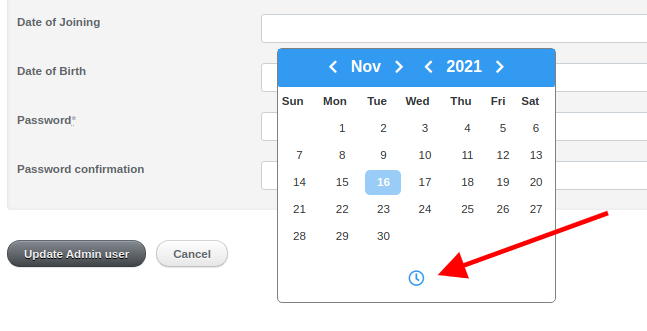
Customise the Toggle Icon
To customize the toggle icon, create a .js file to store the following variables and require it before requiring datetimepicker's javascript file:
| Variable Name | Default Value | Description |
|---|---|---|
| toggleTimeIcon | <i class="far fa-clock"></i> |
Stores the element to be displayed as the toggle time icon |
| toggleCalendarIcon | <i class="far fa-calendar-alt"></i> |
Stores the element to be displayed as the toggle time icon |
|

|
For Example,
// var.js
var toggleTimeIcon = '<div>TIME</div'
var toggleCalendarIcon = '<div>CALENDAR</div>'
// active_admin.js
//= require var.js //make sure this comes first, before requiring datetimepicker's javascript file
//= require date_n_time_picker_activeadmin.js
Please make sure to define these variables before requiring the datetimepicker's javascript file.
Testing
To run tests,
RAILS_ENV=test rspec spec
Patches/Pull Requests
Bug reports and pull requests are welcome on GitHub at https://github.com/NikhithaGraceJosh/date_n_time_picker_activeadmin. This project is intended to be a safe, welcoming space for collaboration, and contributors are expected to adhere to the code of conduct.
- Clone the project
- Checkout your own feature (or bug fix) branch from the
masterbranch (git checkout -b my-new-proposed-feature) - Commit the changes (git commit -m 'New Proposed feature')
- Push the changes to the
my-new-proposed-featurebranch (git push origin my-new-proposed-feature) - Create new Pull Request
Code of Conduct
Everyone interacting in the DateNTimePickerActiveadmin project's codebases, issue trackers, chat rooms and mailing lists is expected to follow the code of conduct.
Copyright
Copyright (c) 2021 Nikhitha Grace Josh. See LICSENCE for more details.