 CafeCar


🚀 Live demo → — click straight into a real auto-generated admin (clients, invoices, articles, users, notes). No signup; the data resets periodically.
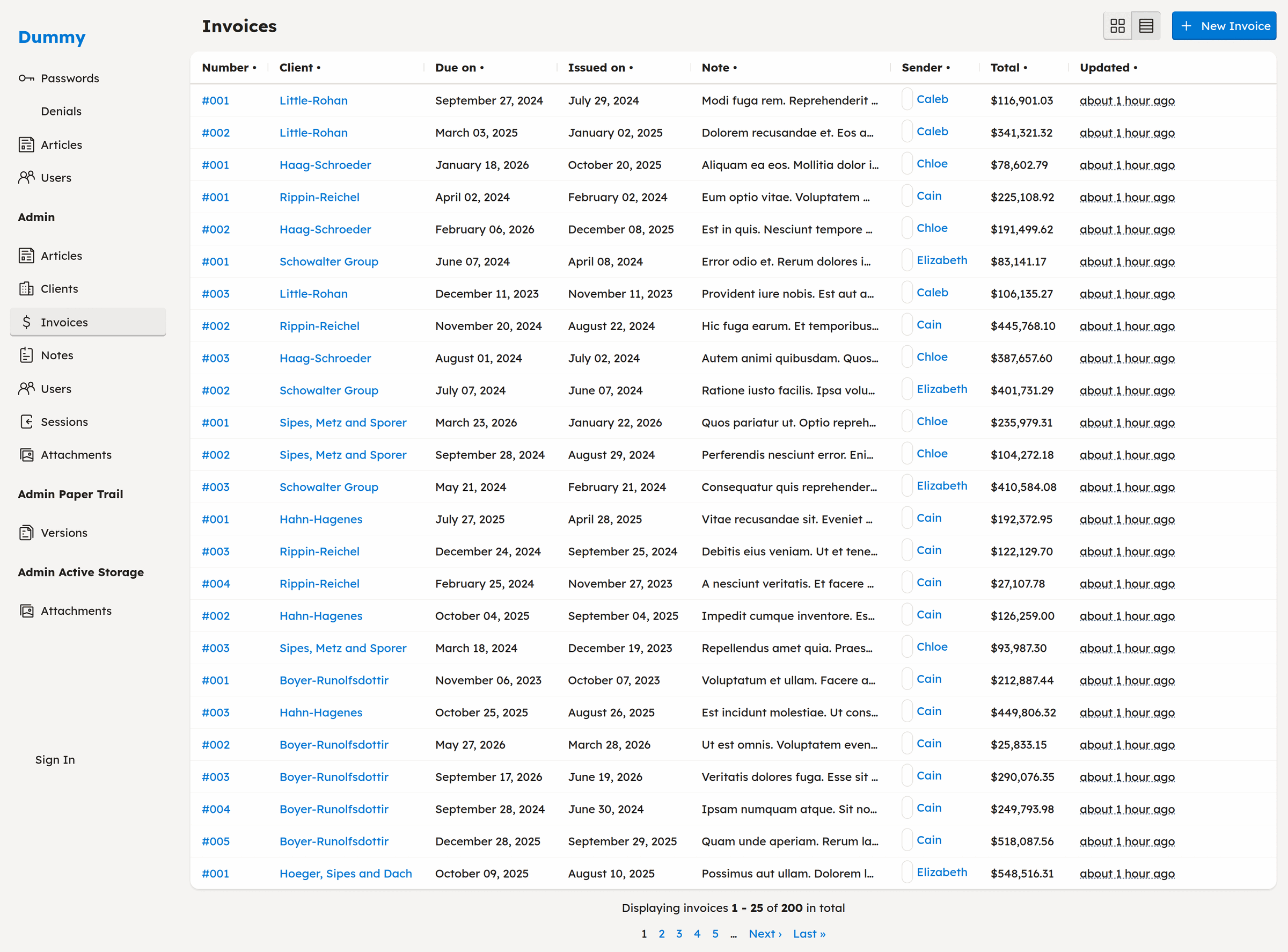
A complete admin index — sortable columns, formatted values, association links, and pagination — auto-generated from a model with one line of controller code. Try the live demo →
CafeCar is a Rails engine that extends the MVC "view" layer to provide automatic CRUD UI generation with sensible defaults. Its philosophy is rooted in the idea that Rails should render something that represents the CRUD operations of your models by default. These defaults can then be expanded or overridden on either an application-wide or model-specific basis.
Perfect for: Admin panels, internal tools, and rapid prototyping.
Table of Contents
- How CafeCar compares
- Features
- Prerequisites
- Installation
- Getting Started
- Core Components
- Advanced Usage
- Sessions & Authentication
- Generators
- Configuration
- Testing
- Contributing
- License
How CafeCar compares
CafeCar is convention-first. Rather than a separate admin app with its own DSL, it extends Rails' own view layer: a plain model renders a working admin with essentially no configuration, and you extend it with the Rails you already know — controllers, Pundit policies, presenters, and ERB. There's no new query language or admin framework to learn; you stay in Rails.
The established alternatives are all solid, and each fits a different taste. Reach for one of them when its model matches how you want to work:
| Gem | Reach for it when… | Trade-off |
|---|---|---|
| ActiveAdmin | You want a mature, batteries-included admin with a rich registration DSL. | You author screens in its Arbre/Ruby DSL rather than plain Rails views. |
| Avo | You prefer defining resources through configuration and want polished paid Pro features. | Config-driven, and the richer tiers are commercial. |
| Administrate | You want to scaffold controllers and views you fully own and edit. | You maintain the generated code as your app grows. |
| RailsAdmin | You want an admin mounted as an engine with almost zero setup. | Heavy runtime introspection and less conventional customization. |
| Trestle | You like a modular, DSL-driven admin with a built-in UI toolkit. | Another admin DSL to learn alongside Rails. |
Reach for CafeCar when you want a Rails-native, convention-over-configuration admin that you extend with ordinary Rails code.
Features
- 🚀 Auto-generated CRUD interfaces - One line of code generates complete index, show, new, edit views
- 🎨 Component-based UI system - Flexible, composable components for building interfaces
- 🔐 Built-in authorization - Pundit integration for attribute-level permissions
- 📊 Smart presenters - Automatic type-aware display of your data
- 🔍 Advanced filtering - Range queries, comparison operators, and association filters
- 🔎 Keyword search - Turnkey search box on every index, matching across a model's text columns with zero per-model setup
- ⬇️ CSV export - One-click "Download CSV" of the current filtered, sorted view on any index
- 📄 Pagination & sorting - Kaminari integration with sortable columns
- ⚡ Hotwire ready - Turbo Streams support out of the box
- 📝 Intelligent forms - Auto-generated forms with smart field detection
Prerequisites
- Ruby 3.3+ (developed and tested against 3.3.5)
- Rails 8.0+ (developed and tested against Rails 8.1)
Installation
Add this line to your application's Gemfile:
gem "cafe_car"
And then execute:
$ bundle install
Run the installer to set up CafeCar in your application:
$ rails generate cafe_car:install
This will:
- Add required gems (bcrypt, paper_trail, factory_bot_rails, faker, rouge) plus development tools (hotwire-livereload, better_errors, binding_of_caller, chrome_devtools_rails, i18n-debug)
- Mount the CafeCar engine at
/under the:adminnamespace - Create
app/policies/application_policy.rb - Add
CafeCar::Controllerto yourApplicationController - Set up JavaScript imports for CafeCar, Trix, and ActionText
Getting Started
Quick Start: Generate a Complete Resource
The fastest way to get started is to generate a complete resource (model + controller + policy):
$ rails generate cafe_car:resource Product name:string price:decimal description:text
This creates:
- Migration and model (
app/models/product.rb) - Controller with CRUD actions (
app/controllers/products_controller.rb) - Policy with permission methods (
app/policies/product_policy.rb)
Run migrations and start your server:
$ rails db:migrate
$ rails server
Navigate to /products and you'll see a working CRUD interface.
Manual Setup
You can also add CafeCar to existing resources:
1. Add to Controller
class ProductsController < ApplicationController
  cafe_car
end
That single line provides:
- All 7 RESTful actions (index, show, new, create, edit, update, destroy)
- Automatic authorization via Pundit
- Filtering and sorting
- JSON/HTML/Turbo Stream responses
- Smart parameter handling
2. Create a Policy
# app/policies/product_policy.rb
class ProductPolicy < ApplicationPolicy
  def index?   = user.present?
  def show?    = user.present?
  def create?  = user.admin?
  def update?  = user.admin?
  def destroy? = user.admin?

  def permitted_attributes
    [:name, :price, :description, :category_id]
  end
end
The policy controls both authorization and which attributes can be edited.
Core Components
Controllers
The CafeCar::Controller module provides automatic CRUD functionality with the
cafe_car class method.
class Admin::ClientsController < ApplicationController
  cafe_car
end
What you get:
- RESTful actions:
index,show,new,edit,create,update,destroy - Authorization: Automatic
authorize!before each action - Smart defaults: Model detection from controller name
- Callbacks: Lifecycle hooks for
render,update,create,destroy - Responders: JSON, HTML, and Turbo Stream responses
Limiting actions:
cafe_car only: [:index, :show]
# or
cafe_car except: [:destroy]
Custom model:
class Admin::ClientsController < ApplicationController
  model Company  # Use Company model instead of Client
  cafe_car
end
Callbacks:
class ProductsController < ApplicationController
  cafe_car

  set_callback :create, :after do |controller|
    NotificationMailer.product_created(controller.object).deliver_later
  end
end
Policies
CafeCar extends Pundit with attribute-level permissions and auto-detection of displayable fields.
class ClientPolicy < ApplicationPolicy
  def index?   = admin?
  def show?    = admin?
  def create?  = admin?
  def update?  = admin?
  def destroy? = update?

  def permitted_attributes
    [:name, :owner_id, :email, :phone]
  end

  class Scope < Scope
    def resolve
      admin? ? scope.all : scope.where(owner: user)
    end
  end
end
Key methods:
permitted_attributes- Attributes that can be edited via formsdisplayable_attributes- Attributes shown in views (auto-detected from columns + associations)displayable_associations- Associations that can be displayedfiltered_attribute?(attr)- Check if attribute should be hidden (uses Rails parameter filters)
Scope pattern:
The Scope class filters collections based on user permissions:
class Scope < Scope
  def resolve
    admin? ? scope.all : scope.where(owner: user)
  end
end
Presenters
Presenters convert model objects into view-ready representations with automatic type detection.
Automatic usage (in views):
<%= present(@product) %>
This automatically:
- Finds the appropriate presenter for the object type
- Checks policy permissions
- Renders displayable attributes
- Uses type-specific formatting
Custom presenters:
# app/presenters/product_presenter.rb
class ProductPresenter < CafeCar::Presenter
  show :name
  show :price
  show :description
  show :category
  show :created_at

  # Custom display method
  def preview
    "#{name} - #{format_currency(price)}"
  end

  private

  def format_currency(amount)
    "$#{amount}"
  end
end
Built-in presenters:
RecordPresenter- ActiveRecord modelsDatePresenter,DateTimePresenter- Dates and timesCurrencyPresenter- Money valuesRangePresenter- Range objectsActiveStorage::AttachmentPresenter- File attachmentsActionText::RichTextPresenter- Rich text contentEnumerablePresenter,HashPresenter- CollectionsNilClassPresenter- Handles nil values gracefully
Presenter methods:
presenter = present(@product)
presenter.show(:name)              # Display single attribute
presenter.attributes               # All displayable attributes
presenter.associations             # All displayable associations
presenter.to_html                  # Render to HTML
UI Components
CafeCar provides a flexible component system for building interfaces.
Basic usage:
# In views or helpers
ui.Card do
  ui.Field label: "Name" do
    @product.name
  end
end
Available components:
Page- Page container with title and actionsGrid,Row- Layout containersCard- Content cardsTable- Data tablesField- Form fields with labelsButton- Action buttonsModal- Modal dialogsAlert- Flash messagesMenu,Navigation- Navigation elements
Component options:
ui.Button "Save", class: "primary", type: "submit"
ui.Field label: "Email", required: true, hint: "We'll never share this"
ui.Card title: "Details", collapsed: false
Custom components:
Create partials in app/views/cafe_car/ui/:
-# app/views/cafe_car/ui/_badge.html.haml
%span.badge{ class: ui.classname }
  = yield
Use it:
ui.Badge class: "success" do
  "Active"
end
Forms
CafeCar provides an enhanced form builder with smart field detection.
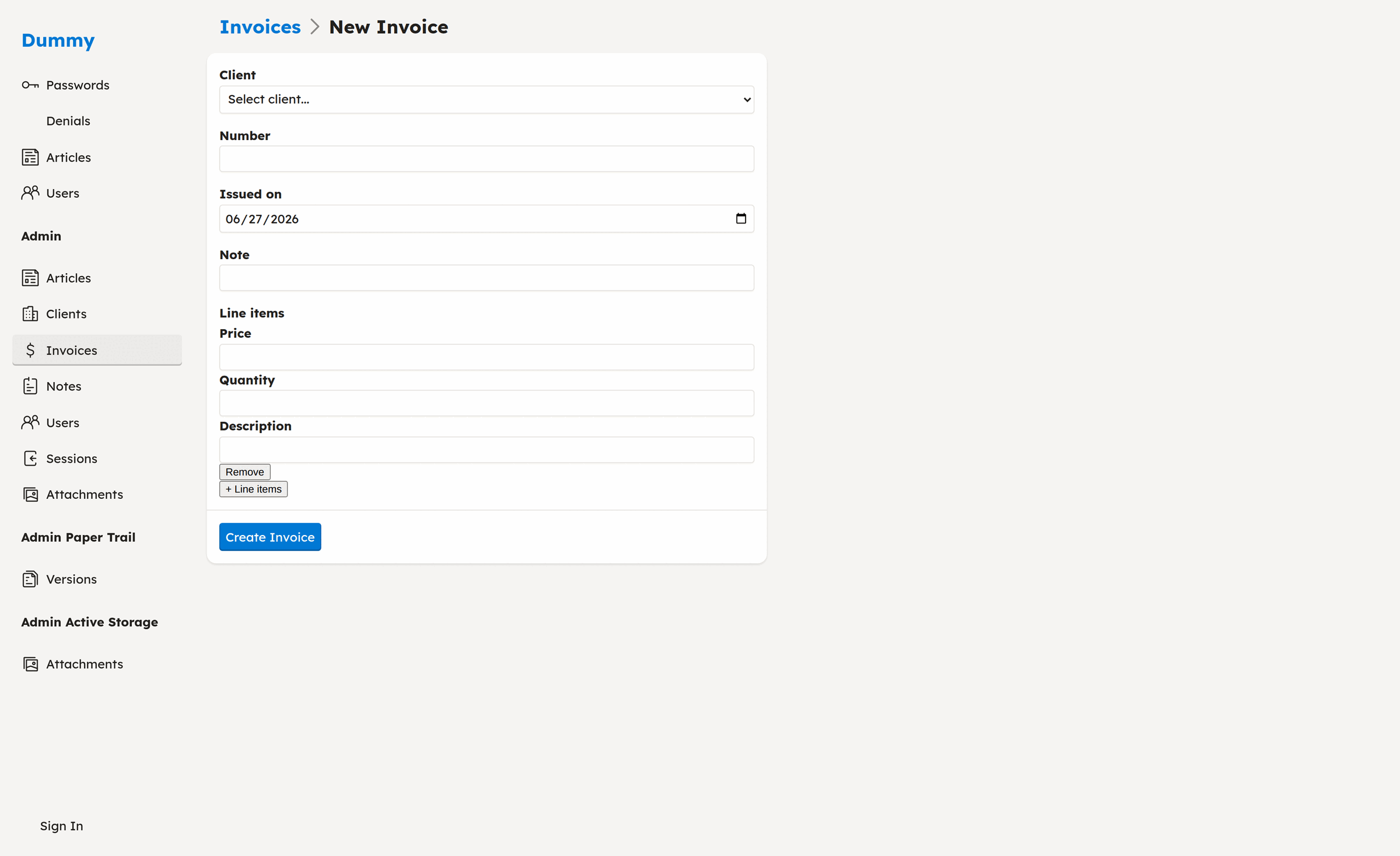
An auto-generated form with a typed date field, an association select, and nested
has_many line items — add and remove rows inline.
Basic forms:
<%= form_with model: @product do |f| %>
  <%= f.input :name %>
  <%= f.input :price %>
  <%= f.input :description, as: :text %>
  <%= f.association :category %>
  <%= f.submit %>
<% end %>
Smart field types:
The form builder automatically detects field types:
- Password fields (columns named
password,password_confirmation) - File attachments (ActiveStorage
has_one_attached,has_many_attached) - Rich text (ActionText
has_rich_text) - Associations (belongs_to, has_many)
- Polymorphic associations
- Dates, datetimes, booleans, etc.
Custom field rendering:
<%= form_with model: @product do |f| %>
  <%= f.field(:price).label %>
  <%= f.field(:price).input class: "currency" %>
  <%= f.field(:price).hint "In USD" %>
  <%= f.field(:price).error %>
<% end %>
Association select:
<%= f.association :category %>
Automatically creates a select dropdown with all categories.
Filtering & Sorting
CafeCar provides advanced filtering with minimal configuration.
URL-based filtering:
/products?name=Widget&price.min=10&price.max=50&created_at=2024-01-01..2024-12-31
Filter operators:
- Range queries:
created_at=2024..2025-01-01 - Comparisons:
price.min=10,price.max=50 - Greater than:
price.gt=10orprice=>10 - Less than:
price.lt=50orprice=<50 - Equals:
status=activeorstatus.eq=active - Arrays:
tags=red,blue,green
Sorting:
/products?sort=name              # Ascending
/products?sort=-price            # Descending (note the minus)
/products?sort=category,-price   # Multiple columns
Keyword search:
Every index ships with a search box — no configuration required. The q
parameter matches the term across the model's string/text columns
(case-insensitive, database-portable), and composes with the filters and sort
above:
/products?q=widget
/products?q=widget&category=tools&sort=-price
Define a search scope on the model to override the default with your own
logic (scoped columns, full-text, etc.):
class Product < ApplicationRecord
  scope :search, ->(term) { where("sku = ?", term) }
end
Columns hidden by Rails' parameter filter (passwords, tokens) are never searched.
CSV export:
Every index also renders as CSV — append .csv or click the "Download CSV"
link. The export honors the current filters and sort and includes matching
records across the whole result set (not just the page on screen). Columns
mirror the JSON index — the same filtered attribute set — so protected columns
(passwords, tokens) and association foreign keys never appear in the file:
/products.csv?category=tools&sort=-price
To keep a large export from materializing an unbounded result set in memory, the
output is capped at CafeCar.csv_export_row_limit rows (default 10_000). When a
download is truncated, CafeCar sets an X-CafeCar-Truncated: true response header
and logs a warning. Raise the limit in an initializer if your tables are larger:
CafeCar.csv_export_row_limit = 50_000
In models:
class Product < ApplicationRecord
  include CafeCar::Model  # Auto-included via engine
end
The model gets:
sorted(*keys)- Parse and apply sort parametersnormalize_sort_key(key)- Internal helper that converts a sort key to Arel order format
Custom filters in controllers:
class ProductsController < ApplicationController
  cafe_car

  private

  def find_objects
    @objects = model.where(active: true)
                    .query(filter_params)
                    .sorted(sort_params)
                    .page(page_params)
  end
end
Advanced Usage
Customizing Views
Override default views by creating templates in your application:
app/views/
  products/
    index.html.haml    # Override index view
    show.html.haml     # Override show view
    _form.html.haml    # Override form partial
CafeCar's default views are in app/views/cafe_car/application/ and serve as
templates.
Custom Responders
class ProductsController < ApplicationController
  cafe_car

  private

  def create
    super
    respond_with object, location: custom_path
  end
end
Authorization Helpers
In controllers:
# Authorize current action
policy(object).update? # Check specific permission
policy(object).permitted_attributes # Get editable attributes
In views:
<% if policy(@product).update? %>
  <%= link_to "Edit", edit_product_path(@product) %>
<% end %>
Current Context
Access current request context anywhere:
CafeCar::Current.user           # Current user
CafeCar::Current.request_id     # Request ID
CafeCar::Current.user_agent     # User agent string
CafeCar::Current.ip_address     # IP address
Set in controllers via set_current_attributes (automatically called by
cafe_car).
Sessions & Authentication
Sessions are opt-in. CafeCar works for plain CRUD with no login at all: when a policy denies access and no sessions infrastructure is present, the request gets a plain 403 Forbidden instead of redirecting to a login page that doesn't exist. Authorization (Pundit policies) is always on; authentication (knowing who the user is) is the part you turn on when you want it.
Enabling sessions
-
Run the generator to add the
sessionstable:$ rails generate cafe_car:sessions $ rails db:migrateThe
CafeCar::Sessionmodel andSessionPolicyship with the engine, so the generator only creates the migration (columns:user,ip_address,user_agent). -
Expose the routes. Mounting the engine already provides them. To expose login at the top level without mounting, add to
config/routes.rb:resource :session, only: %i[new create destroy], controller: "cafe_car/sessions"This gives you
new_session_path(login form) andsession_path(create viaPOST, log out viaDELETE). -
Prepare your user model. It needs
has_secure_passwordand anemail:class User < ApplicationRecord has_secure_password has_many :sessions, dependent: :destroy, class_name: "CafeCar::Session" end -
Different user model name? Set it in an initializer (resolved lazily):
# config/initializers/cafe_car.rb
CafeCar.user_class_name = "Account"
Once sessions are available, an authorization failure for a signed-out visitor redirects to the login form (remembering where they were headed) instead of returning 403.
Helpers
These are available in controllers and views:
authenticated?- truthy when someone is logged incurrent_user- the logged-in user (ornil)current_session- the currentCafeCar::Session
<% if authenticated? %>
  Signed in as <%= current_user.email %>
<% else %>
  <%= link_to "Log in", new_session_path %>
<% end %>
Logging in (POST /session with session[:email]/session[:password]) sets a
signed, http-only cookie; logging out (DELETE /session) clears it.
Generators
Resource Generator
Generate a complete resource (model + controller + policy):
$ rails generate cafe_car:resource Product name:string price:decimal
Controller Generator
Generate just a controller:
$ rails generate cafe_car:controller Products
Policy Generator
Generate just a policy:
$ rails generate cafe_car:policy Product
Notes Generator
Add polymorphic audit trail notes to your app:
$ rails generate cafe_car:notes
Creates:
- Migration for notes table
NotemodelNotableconcern for trackable models
Sessions Generator
Enable opt-in login/logout (see Sessions & Authentication):
$ rails generate cafe_car:sessions
Creates the sessions table migration. The CafeCar::Session model and
SessionPolicy already ship with the engine.
Configuration
Custom Form Builder
# config/initializers/cafe_car.rb
module CafeCar
  class FormBuilder < ActionView::Helpers::FormBuilder
    # Your customizations
  end
end
Custom Presenter
# app/presenters/application_presenter.rb
class ApplicationPresenter < CafeCar::Presenter
  # Application-wide presenter customizations
end

# app/presenters/product_presenter.rb
class ProductPresenter < ApplicationPresenter
  show :name
  show :price
end
Custom Policy
# app/policies/application_policy.rb
class ApplicationPolicy < CafeCar::ApplicationPolicy
  def admin?
    user&.admin?
  end
end
Testing
CafeCar integrates with standard Rails testing tools:
# test/controllers/products_controller_test.rb
class ProductsControllerTest < ActionDispatch::IntegrationTest
  test "index displays products" do
    get products_url
    assert_response :success
  end

  test "create with valid attributes" do
    assert_difference "Product.count", 1 do
      post products_url, params: { product: { name: "Widget" } }
    end
    assert_redirected_to product_path(Product.last)
  end
end
Contributing
Contributions are welcome! Please read CONTRIBUTING.md for
development setup, how to run the tests (bundle exec rake), and PR expectations.
By participating you agree to the Code of Conduct. To report a
security issue, see SECURITY.md.
License
The gem is available as open source under the terms of the MIT License.